Highlights
- End-to-end pipeline
A URL becomes a live browser screenshot, evaluated by Claude through a fixed UX-expert lens, and returned as readable feedback — the full loop already works.
- Secrets handled correctly
The API key lives only in a server-side environment variable from the first commit — never in client code, never in version control.
- Deliberate, not default
Model choice, prompt wording, and validation posture are each a documented decision below, not a default left unexamined.
What this is
The goal: paste in a URL or a Figma node, get back a full heuristic review — WCAG compliance, a Nielsen-Norman-style evaluation, Everett McKay's design principles — as an annotated screenshot plus a set of recommended-fix cards.
Right now this is the core loop, minimally: a page takes a URL, a server-side step screenshots it with a headless browser, and the screenshot goes to Claude with a UX-evaluation system prompt. The reply comes back as plain text below the input. Everything past that — structured card output, automated accessibility checks, Figma support, annotation overlays — is roadmap, not yet built.
Approach
The Visa prototype (see the VDBP build log) started from a fixed functional spec and a fixed Figma file — the work was translating something already decided into working interaction. This one runs the other direction: no spec yet, no CLAUDE.md yet either. Each step is closer to a real question — what happens if the input is a URL instead of free text? What happens if the model's response is too long? — answered, tested, and folded into the next question rather than checked off a plan written in advance.
One page, dark slate background, light-yellow type, a single input and a GO button — unchanged in spirit since the first build.
A single Next.js API route holds the whole server-side pipeline: screenshot, then model call.
Claude, called with a vision input (the screenshot) and a system prompt that fixes its evaluative stance.
None yet, deliberately. A CLAUDE.md is planned once the app's actual shape stops moving.
Milestones
Logged when something changes what the tool can do, or a real design decision gets made — not for every tweak. Smaller fixes and calls live in the changelog near the bottom.
-
Core loop: input to model reply
Builtindex.html → app/page.js · app/api/react/route.js
Started as a static page — "HEURISTICS" centered and bold, a text input, a "GO!" button with 4px rounded corners, dark slate background, light-yellow type. Rebuilt as a Next.js app so the button could call a real server route: it reads the input, calls the Anthropic API with a one-line prompt, and returns the reply as plain text below the button, in the same light-yellow type. The API key loads from
process.env.ANTHROPIC_API_KEYvia a.gitignored.env.local— never hardcoded, never sent to the client.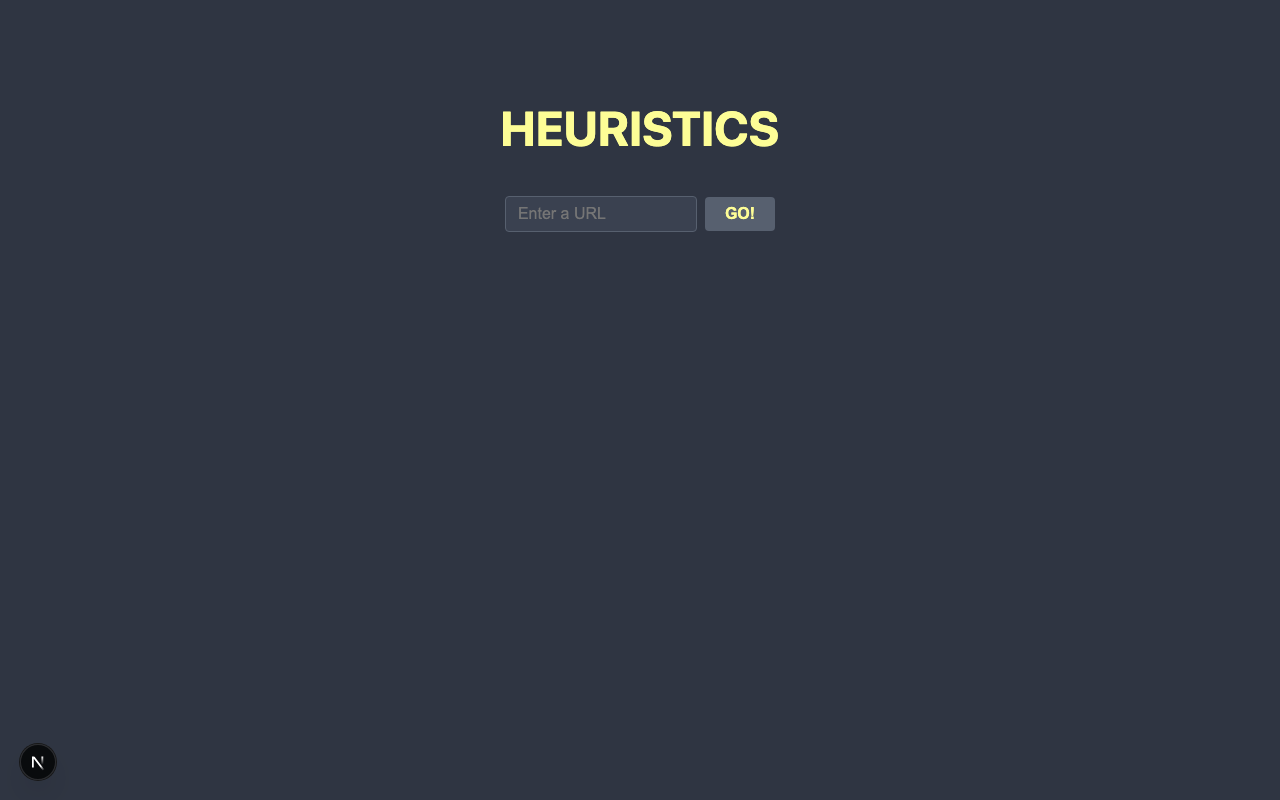
The shell — unchanged in spirit through everything after it -
From typed text to a real UX evaluation
Builtapp/api/react/route.js
The input field's meaning changed from free text to a URL: the API route now launches headless Chromium via Playwright, navigates to the page, takes a full-page screenshot, base64-encodes it, and sends it to Claude as a vision input. Alongside it, a system prompt — "You are a UX expert. Evaluate whatever is sent." — fixes the model's evaluative stance, so every reply reads as a UX evaluation rather than a generic reaction to an image.
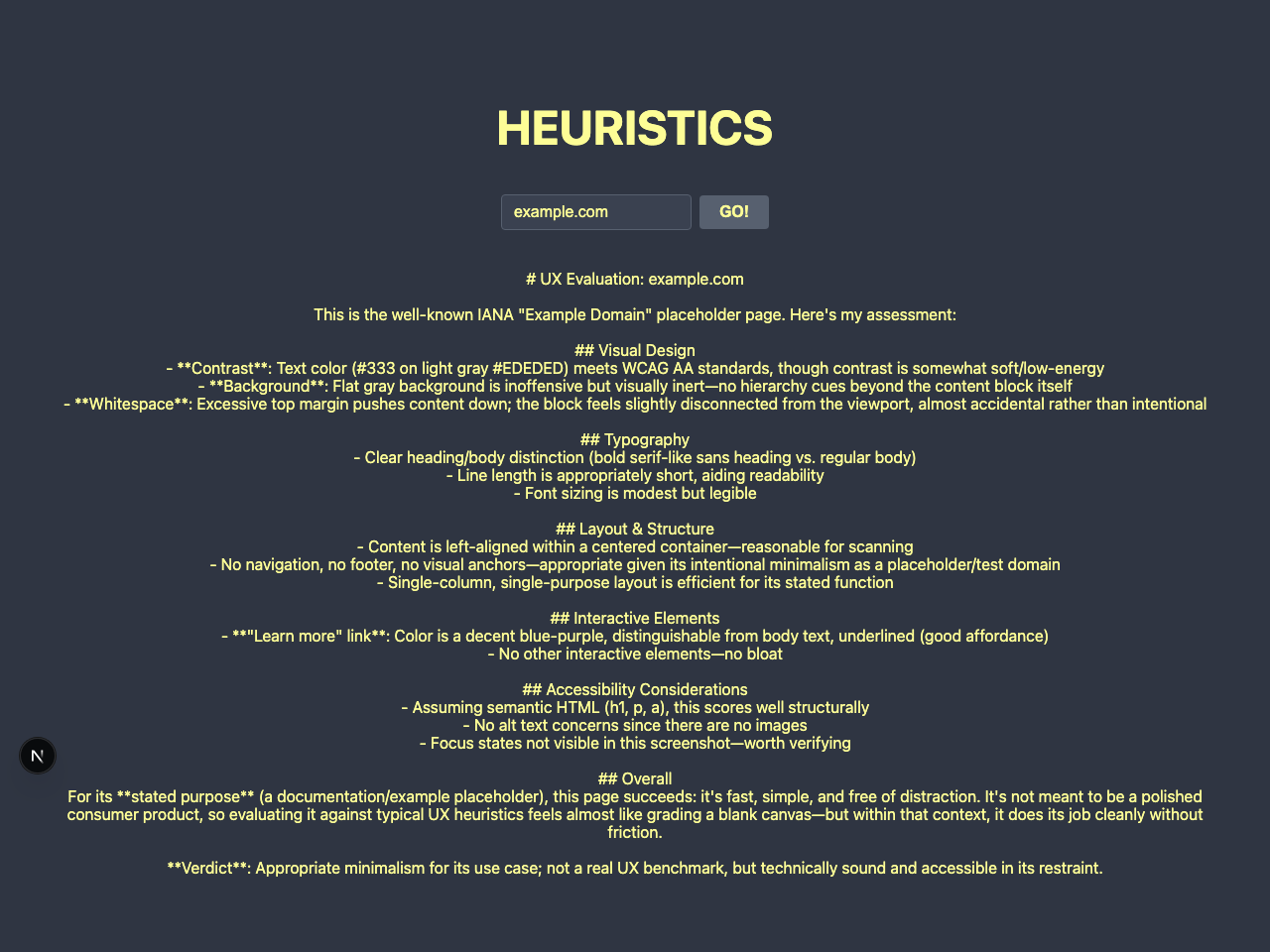
Full round trip — URL in, screenshot taken server-side, evaluation back -
Designing for a variable-length AI response
Builtapp/api/react/route.js · app/page.js
Longer replies were getting cut off mid-sentence — not a layout limit, but a
max_tokens: 300ceiling on the model call, raised to 1024. Separately, anoverflow: hiddenrule was a latent clipping risk for tall content; replaced withdisplay: flow-root, which prevents the same underlying CSS issue without ever clipping. The page has no fixed height anywhere, so it grows and scrolls naturally however long a reply runs — a small but real instance of designing around an AI response whose length isn't fixed or predictable. -
Matching a real Figma spec, responsive
Builtapp/layout.js · app/page.js · app/page.module.css
First real design handoff: pulled exact values out of Figma (via its MCP server, not by eye) rather than approximating from a screenshot — colors, Montserrat at specific weights and sizes per breakpoint, exact component proportions for the URL field and button. Rebuilt the page against that spec: new palette (slate-dark background, amber title and button, grey-standard body text, grey-subtle field/tab text), self-hosted Montserrat via
next/font/google, a placeholder Heuristics/Accessibility tab row with no behavior yet, and a single 620px breakpoint collapsing the desktop layout to mobile. Moved from inline styles to a CSS Module specifically so a real@mediaquery could exist — inline React styles can't express that without JS viewport detection, which causes SSR/hydration issues in Next.js.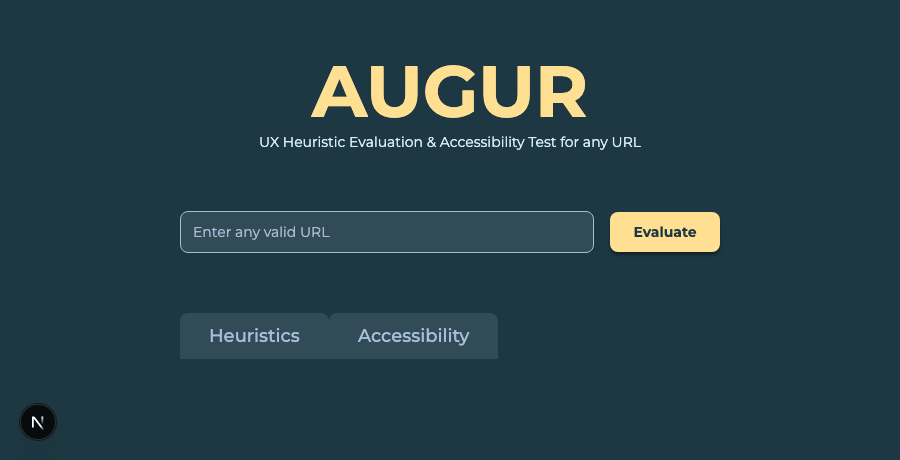
Rebuilt against the Figma file's exact colors, type, and spacing -
Automated accessibility scan, alongside the screenshot
Builtapp/api/react/route.js
Added
axe-core— the same engine behind tools like WAVE and Lighthouse's accessibility audit — running in the same Playwright session that already takes the screenshot, no second page load needed. Its confirmed violations (not the "incomplete" ones, deliberately left for later) get trimmed to id, severity, description, and affected-element count, then sent to Claude as a second, clearly labeled text block alongside the image. The system prompt is untouched on purpose — how Claude should weigh automated fact vs. its own visual judgment is still an open prompt-design question, not a plumbing one.Two real bugs on the way to working: axe-core's default source-loading throws
exports is not definedwhen injected through Next.js's server bundler, fixed by reading axe-core's own prebuiltaxe.min.jsdirectly (via a plainpath.join, sincerequire.resolvegets rewritten by Next's bundler into something that isn't a real file path at runtime). Then Playwright itself threwPlease use browser.newContext()— axe-core's builder opens an internal auxiliary page, which the single-page contextbrowser.newPage()shortcut doesn't allow; fixed by creating an explicit context first. -
Real interactivity: hover/press states, a loading animation, and the actual tab split
Builtapp/page.js · app/page.module.css · app/api/react/route.js
Pulled the Evaluate button's and tabs' hover/pressed/active states from Figma (values not cached from the original redesign pass — a second, targeted lookup) and wired them up as pure CSS, plus a bouncing-dots loading animation on the button: three 8px dots, 10px apart, staggered on a shared 1-second loop so one 0.4s rest and three sequential 0.2s bounces repeat continuously until the response is ready.
Then the real work: the tabs actually split content now, not just visually toggle. The system prompt already asked Claude for "HEURISTICS"/"ACCESSIBILITY" section titles; tightened to require them as exact
#headings on their own line, reliable enough for the frontend to split the raw reply on theACCESSIBILITYheading — with a fallback to show the whole reply under Heuristics if that heading's ever missing, since a text instruction is reliable, not guaranteed. Considered a full JSON restructure instead; deferred that to the "structured card output" roadmap item rather than take on a bigger rewrite for this step.Built out the full loading choreography to match: the empty-state copy (or a previous result) sits still for 1.2s after clicking Evaluate, then fades over 0.6s; both tabs go inert for the whole loading window (a real
disabledattribute, not just styling) so there's nothing to switch between yet; when the response lands, Heuristics auto-activates and its content appears immediately, with Accessibility one real click away. AloadingRefguards against a race where a fast response could otherwise get wiped by the fade-cleanup timer.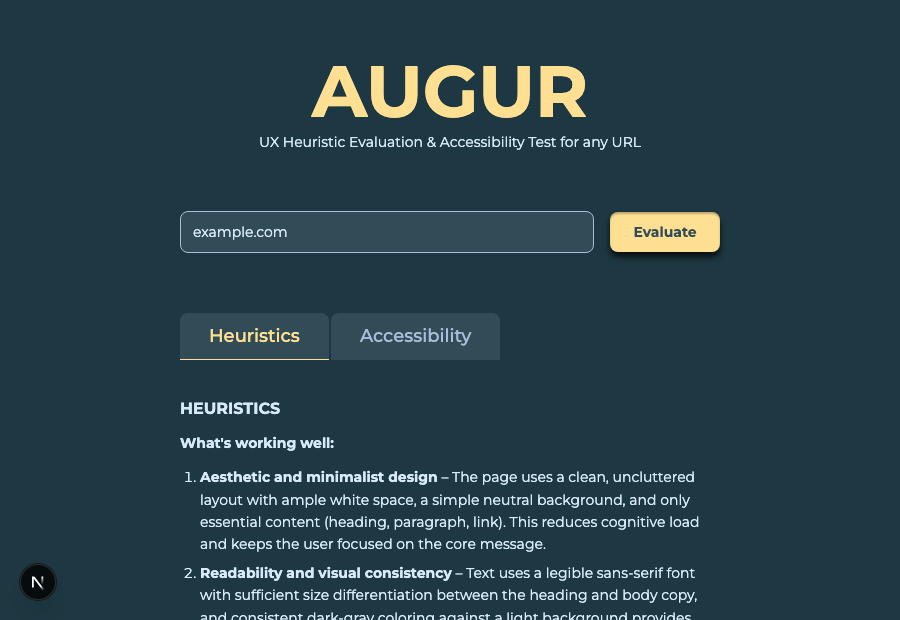
The tabs now split real content, not just a visual toggle -
Structured output: a real JSON schema, validated against live data
Builtapp/api/react/route.js — wired in and shipped in the next session below
Built real card components from Figma (severity badge, confidence badge, working-quality badge, three card types), then hit the actual limit of the free-text approach: reliably parsing ~6–7 fields per card across ~11 items via regex is fragile in a way that only mattered once there was a real UI slot waiting for each value. Replaced free-text parsing with Claude's tool-use — a JSON schema with the field list moved out of prose and into the schema itself, with
enumconstraints on every fixed-vocabulary field (severity, confidence, working-quality rating).The
enumconstraint is a structural fix for both bugs from the last prompt round, not just a rephrasing: "Serious" or "Effective" aren't just discouraged now, they're not valid values the schema will accept.secondaryStandardsalso moved from a string needing a"none"sentinel to a real array — empty when there isn't one — which quietly deletes the whole "if only one standard, return 'none'" instruction; the data shape expresses it natively instead of needing a workaround in prose.System prompt (trimmed — the field list and vocabulary now live in the schema below, not here):
You are being given an image of a URL and a structured text block of accessibility findings (WCAG 2.2) for that same URL from an automated scan. Conduct a heuristic evaluation of the URL image based on the Nielsen-Norman Group's 10 heuristic standards. Weight the content of the page as less than the structure and interaction elements of the page. For heuristic issues: list in order of severity. Check your list of issues against the accessibility issues before finalizing — if a heuristic issue is already covered by one of the accessibility issues, skip it and surface the next most severe issue instead. If fewer than 4 real issues exist, return fewer. Do not invent issues to reach the limit. For accessibility issues, treat the provided scan data as verified fact — do not evaluate or second-guess it, only describe and explain it. List in order of severity. If fewer than 5 real issues exist in the data, return fewer. Submit your evaluation using the submit_evaluation tool.
Tool schema (submit_evaluation):
{ "name": "submit_evaluation", "input_schema": { "type": "object", "properties": { "workingWell": { "type": "array", "minItems": 2, "maxItems": 2, "items": { "type": "object", "properties": { "rating": { "enum": ["Excellent", "Efficient", "Strong", "Adequate"] }, "standard": { "type": "string" }, "summary": { "type": "string" }, "confidence": { "enum": ["High Confidence", "Confident", "Suspected", "Uncertain"] } }, "required": ["rating", "standard", "summary", "confidence"] } }, "heuristicIssues": { "type": "array", "maxItems": 4, "items": { "type": "object", "properties": { "severity": { "enum": ["Critical", "Severe", "Moderate", "Minor"] }, "standard": { "type": "string" }, "title": { "type": "string" }, "description": { "type": "string" }, "recommendation": { "type": "string" }, "secondaryStandards": { "type": "array", "items": { "type": "string" } }, "confidence": { "enum": ["High Confidence", "Confident", "Suspected", "Uncertain"] } }, "required": ["severity", "standard", "title", "description", "recommendation", "secondaryStandards", "confidence"] } }, "accessibilityIssues": { "type": "array", "maxItems": 5, "items": { "type": "object", "properties": { "severity": { "enum": ["Critical", "Severe", "Moderate", "Minor"] }, "standard": { "type": "string" }, "title": { "type": "string" }, "description": { "type": "string" }, "elementsAffected": { "type": "string" }, "recommendation": { "type": "string" } }, "required": ["severity", "standard", "title", "description", "elementsAffected", "recommendation"] } } }, "required": ["workingWell", "heuristicIssues", "accessibilityIssues"] } }
Real output, run against h1.co (trimmed to 2 of 4 heuristic issues and 2 of 5 accessibility issues for length — full run had all 4/5, all valid enum values,
stop_reason: "tool_use", no truncation):{ "workingWell": [ { "rating": "Strong", "standard": "Aesthetic and Minimalist Design", "summary": "The hero and 'Trusted by' sections use a clean, uncluttered layout with strong brand color and clear typographic hierarchy, which helps convey a professional healthcare-tech image.", "confidence": "Confident" }, { "rating": "Adequate", "standard": "Consistency and Standards", "summary": "Repeated card-based patterns for resources and solutions, along with consistent CTA button styling ('Learn More', 'Read more', 'Request a Demo'), give the page a consistent visual language.", "confidence": "Confident" } ], "heuristicIssues": [ { "severity": "Critical", "standard": "Visibility of System Status", "title": "Intrusive overlay message mimics a browser/security error", "description": "A large bold banner reading \"We couldn't verify the security of your connection\" appears directly over the hero content, styled like a system-level security warning rather than site content...", "recommendation": "Remove or clearly restyle this message so it cannot be mistaken for a genuine browser security warning...", "secondaryStandards": ["Error Prevention", "Match Between System and the Real World"], "confidence": "High Confidence" }, { "severity": "Severe", "standard": "Recognition Rather Than Recall", "title": "Empty/placeholder-looking content sections", "description": "Several sections appear to have missing or unloaded content, showing large empty areas with only a heading...", "recommendation": "Verify all content blocks render correctly across viewports and add fallback/loading states so sections never appear empty.", "secondaryStandards": ["Aesthetic and Minimalist Design"], "confidence": "Confident" } ], "accessibilityIssues": [ { "severity": "Severe", "standard": "WCAG 2.2 - 1.4.3 (wcag2aa, wcag143)", "title": "Insufficient color contrast", "description": "Four elements on the page fail to meet the minimum color contrast ratio required...", "elementsAffected": "4 elements, likely including text over the blue background sections and hero overlay text", "recommendation": "Adjust text and background color combinations to meet at least a 4.5:1 contrast ratio for normal text..." }, { "severity": "Severe", "standard": "WCAG 2.2 - 2.4.4 / 4.1.2 (wcag2a, wcag244, wcag412)", "title": "Links missing discernible text", "description": "Eight links on the page lack accessible names, meaning screen reader users cannot determine their purpose or destination.", "elementsAffected": "8 links, potentially icon-only links such as social media icons in the footer and arrow/carousel controls near the logos section", "recommendation": "Add descriptive aria-label or visually hidden text to all icon-only or ambiguous links..." } ] }
-
The cards, for real — built from Figma, wired to live data
Builtapp/page.js · app/page.module.css
Built the three card types, the badge system (severity, confidence, working-quality — each with its own icon and light/dark color pair pulled from the updated
CLAUDE.mdpalette), and the six header color variants, all as local components insidepage.jsrather than a newcomponents/folder — three card types doesn't yet justify splitting files. Reviewed first as a static mockup with hardcoded "Lorem ipsum" text and one card of each type, so the design could be checked before wiring it to anything live — then the schema from the previous session dropped in underneath it with no rendering changes needed, since the card renderer was already written generically over arrays rather than hardcoded to "exactly one" of anything.Three real bugs, each a good example of the gap between "looks right" and "is right":
- Header title misaligned with its badge — the obvious-looking fix (tweaking
line-heighton the title) did nothing, because the actual cause was a stale.result prule left over from the pre-card markdown-rendering days. As a class+element selector it had higher specificity than the card's own class-only rules, so it was silently overriding.cardHeaderTitle's margin — a 12px phantom bottom margin was throwing off the flex row's centering by exactly 6px. Found by measuring actualgetBoundingClientRect()values rather than trusting a screenshot, which is also how the first, wrong theory got ruled out instead of shipped. - Cards rendering at 588px instead of 540px —
width: 100%plus horizontal padding under the defaultbox-sizing: content-boxadds the padding on top of the 100% instead of inside it: 540 + 24 + 24 = 588, exactly the gap reported. Fixed with a scopedbox-sizing: border-boxon just the two affected rules, rather than a global reset that risked shifting other already-tuned elements (like the URL field) that weren't hitting this bug. - A malformed API response caught in testing before either of the above: one live run returned
workingWellas a string containing a stringified copy of the entire response, not the array the schema requires. Confirmed non-reproducible on a second run, but added a defensive check inroute.jsanyway —enumvalues are followed near-perfectly, but a schema'stype: "array"is a strong steering signal, not a hard guarantee, and a rare malformed response is better surfaced as a clear error than passed on to break whatever renders next.
Verified end to end in a real browser, not just via curl: loading choreography still holds with real cards instead of markdown, tabs correctly stay inert until data lands, a full response renders all 6 possible Heuristics cards and 5 Accessibility cards without breaking, and a simple page with fewer real issues degrades to a shorter, still-correct card stack rather than looking broken or empty.
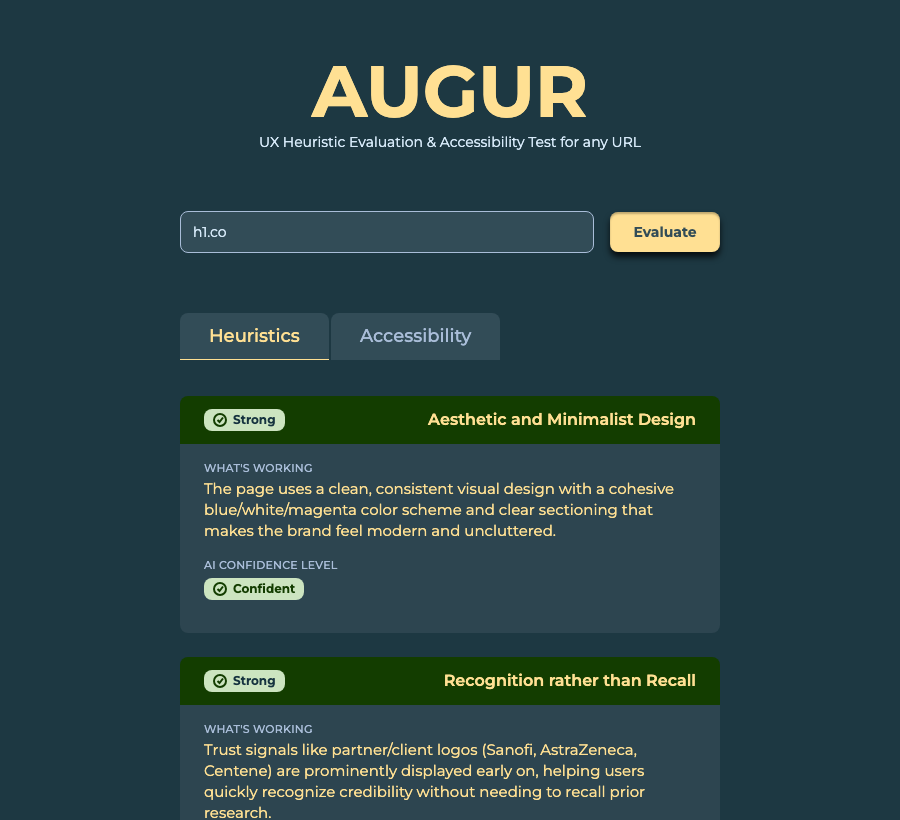
Real cards, real data — Critical/Severe/Moderate headers, confidence and rating badges, all from a live evaluation - Header title misaligned with its badge — the obvious-looking fix (tweaking
-
Redesigned loading state: a cycling phrase, not just dots
Builtapp/page.js · app/page.module.css
Tabs are no longer rendered-but-disabled before a result exists — they're not in the DOM at all, replaced by a fixed-height "tab zone" that reserves the same space so nothing shifts when they do appear. Into that zone: a large semi-bold phrase, cycling through 10 options ("...evaluating...", "...running heuristics...", and so on), each fading in over 0.6s, holding 1.8s, fading out over 0.6s, then advancing — looping back to the first phrase if a response takes long enough to need it. The placeholder copy no longer fades on submit at all; on a first-ever evaluation it just stays put for the whole wait. On a repeat submission, the previous tabs and cards fade out over 0.6s the instant Evaluate is clicked, while the phrase cycle simultaneously fades in, always restarting at "...evaluating...".
The cycle is driven by one
useEffectkeyed on[loading, phraseIndex]: it fades the current phrase in, schedules its own hold-then-fade-out, then advances the index — which re-triggers the same effect for the next phrase, chaining indefinitely whileloadingstays true. Its cleanup fires the instantloadingflips false, so nothing lingers or fires after the fact.Originally scoped to also fade the arrival of real data in over 0.18s — dropped in favor of an instant snap once it was clear that gracefully interrupting a CSS transition already mid-flight (partway through a 0.6s fade-in, or mid-hold) to redirect it into a different, faster transition was real added complexity for a moment most users won't consciously register either way. Simpler code, same result where it actually matters.
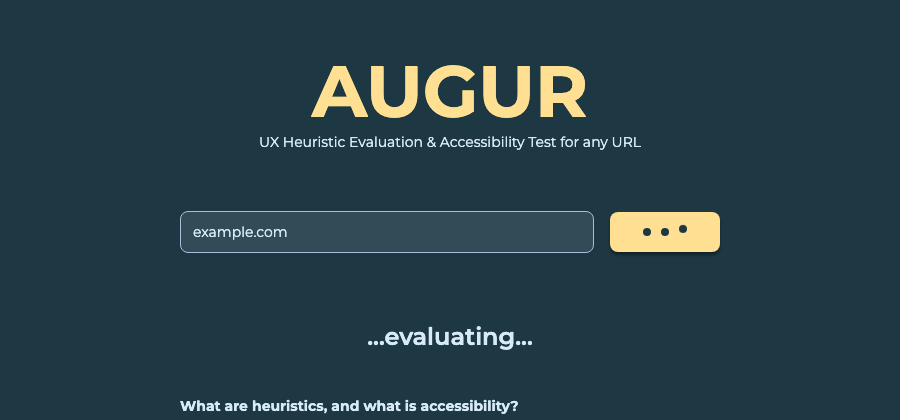
The phrase cycle, mid-fade, with the placeholder still visible beneath it
Where this is headed
Not yet built, roughly in the order it's likely to get tackled:
- Annotated screenshot
Rather than asking the model to guess pixel coordinates, pull real element positions from the live DOM (already available via Playwright) and draw numbered markers from exact bounding boxes, paired with numbered cards.
- Figma node input
A second, separate input path — Figma's own image-export API, not Playwright — since a Figma node has no live DOM to pull accessibility data from.
- Heuristic frameworks
Layer in Nielsen-Norman's heuristics and Everett McKay's principles as explicit evaluation lenses alongside WCAG, rather than one generic "UX expert" prompt.
System prompt log
The system prompt is a design artifact in its own right — every version sent to Claude alongside each screenshot, in order. There was no system prompt at all until the screenshot pipeline was in place; before that, the instruction lived entirely in the per-request message ("React to this: ...").
-
v12026-07-04
You are a UX expert. Evaluate whatever is sent.
Established a fixed evaluative lens. Before this, the model reacted to the screenshot with no stance at all — this made every reply read as a UX evaluation specifically, which is the actual point of the app.
-
v22026-07-04
You are a UX expert. Evaluate whatever is given to you in a professional UX critique. Say what's working well, what can be improved, and suggestions for how to improve it.
Moved from an open-ended reaction to a structured critique — what's working, what to improve, concrete suggestions — closer to a real UX critique format, and a natural stepping stone toward the card-based output on the roadmap.
-
v32026-07-05
Give a professional evaluation of whatever is sent.
A deliberate experiment: dropping "UX" and "expert" entirely to see whether the evaluative lens holds without being told what kind of expert to be. It still reads as design-flavored — Claude infers that from getting an image — but the response loses the explicit working/improve/suggest structure v2 established.
-
v42026-07-05
Please give an evaluation of whatever is sent based on WCAG 2.2 standards. Refer to https://www.w3.org/TR/WCAG22/ for these standards.
First attempt at a standards-framed evaluation — and a real instance of the deterministic-vs-probabilistic trust problem on the roadmap. This API call has no browsing or tool use wired in, so Claude never actually fetches that URL; it cites specific WCAG success-criterion numbers from its training data and estimates hex color values from the screenshot ("approx."), sounding precise while actually inferring. Confirms automated tooling (axe-core) belongs alongside this, not instead of it, once that's built.
-
v52026-07-05
Evaluate whatever is sent to you against the Norman-Neilson Group's 10 Heuristic Standards. Say what is working well, what needs improvement, and a recommendattion for what needs improvement.
Sent with the typo intact ("Norman-Neilson," "recommendattion") on purpose, to see how the model handles it. Claude silently read it as the real Nielsen Norman Group and evaluated against their actual 10 usability heuristics, naming the correction in its reply rather than getting stuck on the misspelling — a small, real example of how forgiving the model is of imprecise prompt wording.
-
v62026-07-05
Evaluate whatever is sent to you against the Nielsen Norman Group's 10 Heuristic Standards. Say what is working well, what needs improvement, and a recommendation for what needs improvement.
Corrected the two typos from v5 ("Norman-Neilson" → "Nielsen Norman," "recommendattion" → "recommendation") now that the experiment in tolerance was done. Wording and intent otherwise unchanged.
-
v72026-07-06
You are being given an image of a URL and a structured text block of accessibility findings for that same URL from an automated scan. Conduct a heuristic evaluation of the URL image based on the Nielsen-Norman Group's 10 heuristic standards. Weight the content of the page as less than the structure and interaction elements of the page. Return 2 things about the URL that are working well. Then list up to 5 most important issues that the heuristic evaluation finds need improvement, along with the severity of those issues (Minor/Moderate/Severe/Critical), and a confidence level of your assessment (Confident/Observed/Suspected/Unsure- needs confirmation). Describe the element on the page you are assessing, address what heuristic standard(s) it has been measured against, describe in plain English what the problem is. Give a recommendation on how it can be resolved. Do this for all heuristic issues reported back. The 2 things about the URL that are working well can be less structured. Give a title above these findings, both the things working well and the issues that need improvement: HEURISTICS For the accessibility information given to you in a structured text block, treat this as verified fact. Return up to 5 of the most important issues you find in the accessibility report, in order of severity. Describe the elements of the site that each of them affect. Report the severity level as found in the text block. Explain in plain English what is wrong with each, and propose a solution. Give a title above this report: ACCESSIBILITY
The first prompt written alongside the axe-core integration, and the first to go through several rounds of real back-and-forth before shipping rather than one shot: separating a severity scale from a confidence scale for heuristic issues (subjective judgment, self-rated uncertainty) while telling Claude to treat the axe-core data as verified fact and report its severity verbatim (objective, no self-rating needed) — a direct, working example of the deterministic-vs-probabilistic distinction this whole project keeps circling back to. Also the first prompt to explicitly ask for section titles (HEURISTICS / ACCESSIBILITY) previewing the tab split in
CLAUDE.md, and the first that required realmax_tokenstuning: 2100 truncated the accessibility section mid-item; 3200 completed cleanly. -
v82026-07-06
You are being given an image of a URL and a structured text block of accessibility findings for that same URL from an automated scan. Conduct a heuristic evaluation of the URL image based on the Nielsen-Norman Group's 10 heuristic standards. Weight the content of the page as less than the structure and interaction elements of the page. Return 2 things about the URL that are working well. Then list up to 5 most important issues that the heuristic evaluation finds need improvement, along with the severity of those issues (Minor/Moderate/Severe/Critical), and a confidence level of your assessment (Confident/Observed/Suspected/Unsure- needs confirmation). Check your list of up to 5 issues against the list of the 5 most important issues surfaced in the accessibility information - if a heuristic issue is already covered by an issue in the 5 accessibility issues you will surface, skip that heuristic issue and surface the next most severe issue instead. There may be up to or less than 5 heuristic issues surfaced. Describe the element on the page you are assessing, address what heuristic standard(s) it has been measured against, describe in plain English what the problem is. Give a recommendation on how it can be resolved. Do this for all heuristic issues reported back. The 2 things about the URL that are working well can be less structured. Give a title above these findings, both the things working well and the issues that need improvement: HEURISTICS For the accessibility information given to you in a structured text block, treat this as verified fact. Return up to 5 of the most important issues you find in the accessibility report, in order of severity. Describe the elements of the site that each of them affect. Report the severity level as found in the text block. Explain in plain English what is wrong with each, and propose a solution. Give a title above this report: ACCESSIBILITY
Added one instruction: cross-check the up-to-5 heuristic issues against the up-to-5 accessibility issues, and skip any heuristic issue already covered by an accessibility one rather than reporting the same problem twice under two labels. Deliberately left "already covered by" undefined rather than spelling out a strict-vs-thematic matching rule — an intentional choice to let the model's own judgment decide, embracing rather than minimizing the resulting run-to-run variability. Considered moving the instruction to a final review-style paragraph after both sections instead of inline within HEURISTICS, but since Claude processes the entire prompt before generating any output, paragraph order doesn't gate correctness here — kept inline, next to the behavior it modifies, for human readability when maintaining this file.
-
v92026-07-07
You are being given an image of a URL and a structured text block of accessibility findings for that same URL from an automated scan. Conduct a heuristic evaluation of the URL image based on the Nielsen-Norman Group's 10 heuristic standards. Weight the content of the page as less than the structure and interaction elements of the page. Return 2 things about the URL that are working well. Then list up to 5 most important issues that the heuristic evaluation finds need improvement, along with the severity of those issues (Minor/Moderate/Severe/Critical), and a confidence level of your assessment (Confident/Observed/Suspected/Unsure- needs confirmation). Check your list of up to 5 issues against the list of the 5 most important issues surfaced in the accessibility information - if a heuristic issue is already covered by an issue in the 5 accessibility issues you will surface, skip that heuristic issue and surface the next most severe issue instead. There may be up to or less than 5 heuristic issues surfaced. Describe the element on the page you are assessing, address what heuristic standard(s) it has been measured against, describe in plain English what the problem is. Give a recommendation on how it can be resolved. Do this for all heuristic issues reported back. The 2 things about the URL that are working well can be less structured. Give a title above these findings, both the things working well and the issues that need improvement: # HEURISTICS (the title must be on its own line, with the "#" markup to indicate a heading) For the accessibility information given to you in a structured text block, treat this as verified fact. Return up to 5 of the most important issues you find in the accessibility report, in order of severity. Describe the elements of the site that each of them affect. Report the severity level as found in the text block. Explain in plain English what is wrong with each, and propose a solution. Give a title above this report: # ACCESSIBILITY (the title must be on its own line, with the "#" markup to indicate a heading)
Not a content change — tightened the existing section-title instruction so the frontend could reliably split the reply into two real tabs instead of one blended blob. Requiring an exact
#heading, on its own line, is what makes text-based splitting practical without a full JSON rewrite. Still not a hard guarantee, since the model's compliance with any text instruction is probabilistic rather than contractual — the frontend's split function matches case-insensitively and falls back to showing the whole reply under Heuristics if the heading's ever missing, so a rare miss degrades gracefully instead of breaking. -
v102026-07-08
You are being given an image of a URL and a structured text block of accessibility findings (WCAG 2.2) for that same URL from an automated scan. Conduct a heuristic evaluation of the URL image based on the Nielsen-Norman Group's 10 heuristic standards. Weight the content of the page as less than the structure and interaction elements of the page. Return 2 things about the URL that are working well. Give each: 1. A rating (Excellent, Efficient, Strong, Adequate), 2. Cite the one heuristic standard (of the Nielsen-Norman Group's 10) it is most related to, 3. a short (1-2 sentence) summary of what is working well and why, 4. A confidence rating of your assessment (High Confidence, Confident, Suspected, Uncertain) based on the URL image. Then find up to 4 most of the important issues that the heuristic evaluation finds need improvement. For each issue, return: 1. The severity of the issue (Critical, Severe, Moderate, Minor), 2. the one heuristic standard it most relates to, 3. a title for this issue (what's wrong in plain English), 4. a description of the issue (short paragraph on what it is, how and/or why it violates the standard, why this is important) in plain English, 5. a recommendation to fix the issue, 6. any other secondary heuristic standards it may relate to (optional - if only one standard, return "none" for secondary standards), 7. your confidence in your evaluation of this issue based on a screenshot image (High Confidence, Confident, Suspected, Uncertain). List these for each of the up to 4 issues returned. List the issues in order of severity. Check your list of up to 4 issues against the list of the 5 most important issues surfaced in the accessibility information - if a heuristic issue is already covered by an issue in the 5 accessibility issues you surface, skip that heuristic issue and surface the next most severe issue instead. If no other issues exist, do not invent any. There may be up to or less than 4 heuristic issues surfaced. Give a title above these heuristic findings, both the things working well and the issues that need improvement: # HEURISTICS (the title must be on its own line, with the "#" markup to indicate a heading) For the accessibility information given to you in a structured text block, treat this as verified fact. Return up to 5 of the most important issues you find in the accessibility report, in order of severity. For each of the up to 5 accessibility issues, return: 1. Severity of the issue (Critical, Severe, Moderate, Minor), 2. The WCAG 2.2 standard the issue violated, 3. a descriptive title for this issue (what's wrong in plain English), 4. A description of this issue in plain English (a short paragraph of what it is, how/why it violates the WCAG standard, why this is important), 5. The elements on the page it is affecting, with approximate location on the page if that is applicable, 6. A recommendation for how to fix it. Give a title above these accessibility findings: # ACCESSIBILITY (the title must be on its own line, with the "#" markup to indicate a heading)
The big one: rewritten field-by-field against real Figma card components (a "components" page with a severity badge, a confidence badge, a working-quality badge, and three card types — heuristic-improvement, heuristic-working, accessibility) rather than written first and rendered later. Every field the prompt now asks for corresponds to an exact slot on a card, and every fixed-vocabulary value (severity, confidence, working-quality rating) was checked against the literal strings the badge components render, not just written to sound reasonable. Positives went from freeform text to four structured fields (rating, standard, summary, confidence) to match the working-card, which also surfaced a real component gap — severity headers only existed for critical/moderate until severe/minor variants were added to match.
Three review passes before this shipped, which is its own small case study in prompt review: pass one caught the confidence scale not matching any badge state at all (
Observed/Unsure- needs confirmationdidn't exist as options) and the positives section missing a rating and confidence entirely; pass two caught "Effective" where the badge literally says "Efficient" — a real word, just the wrong one, the kind of mismatch a spellchecker won't catch; pass three caught a dropped closing instruction that would have silently broken the tab split — the reply would have rendered complete and readable, just entirely under the Heuristics tab, with nothing in Accessibility. None of the three were visible from reading the prompt in isolation; all three only showed up by checking it against what the cards and the frontend's split logic actually require. -
v112026-07-08
You are being given an image of a URL and a structured text block of accessibility findings (WCAG 2.2) for that same URL from an automated scan. Conduct a heuristic evaluation of the URL image based on the Nielsen-Norman Group's 10 heuristic standards. Weight the content of the page as less than the structure and interaction elements of the page. Return 2 things about the URL that are working well. Give each: 1. A rating (Excellent, Efficient, Strong, Adequate), 2. Cite the one heuristic standard (of the Nielsen-Norman Group's 10) it is most related to, 3. a short (1-2 sentence) summary of what is working well and why, 4. A confidence rating of your assessment (High Confidence, Confident, Suspected, Uncertain) based on the URL image. Then find up to 4 most of the important issues that the heuristic evaluation finds need improvement. For each issue, return, each on their own line: 1. The severity of the issue (use only: Critical, Severe, Moderate, Minor), 2. the one primary heuristic standard it most relates to, 3. a title for this issue (what's wrong in plain English), 4. a description of the issue (short paragraph on what it is, how and/or why it violates the standard, why this is important) in plain English, 5. a recommendation to fix the issue, 6. any other secondary heuristic standards it may relate to (optional - if only one standard, return "none" for secondary standards, separate from the primary standard), 7. your confidence in your evaluation of this issue based on a screenshot image (High Confidence, Confident, Suspected, Uncertain). List these for each of the up to 4 issues returned. List the issues in order of severity. Check your list of up to 4 issues against the list of the 5 most important issues surfaced in the accessibility information - if a heuristic issue is already covered by an issue in the 5 accessibility issues you surface, skip that heuristic issue and surface the next most severe issue instead. If no other issues exist, do not invent any. There may be up to or less than 4 heuristic issues surfaced. Give a title above these heuristic findings, both the things working well and the issues that need improvement: # HEURISTICS (the title must be on its own line, with the "#" markup to indicate a heading) For the accessibility information given to you in a structured text block, treat this as verified fact. Return up to 5 of the most important issues you find in the accessibility report, in order of severity. For each of the up to 5 accessibility issues, return: 1. Severity of the issue (use only: Critical, Severe, Moderate, Minor - if accessibility findings report "serious" severity, return it as "Severe"), 2. The WCAG 2.2 standard the issue violated, 3. a descriptive title for this issue (what's wrong in plain English), 4. A description of this issue in plain English (a short paragraph of what it is, how/why it violates the WCAG standard, why this is important), 5. The elements on the page it is affecting, with approximate location on the page if that is applicable, 6. A recommendation for how to fix it. Give a title above these accessibility findings: # ACCESSIBILITY (the title must be on its own line, with the "#" markup to indicate a heading)
Fixed two real bugs observed in live output, not hypothetical ones. First: secondary heuristic standards occasionally landed in parentheses on the same line as the primary standard instead of as their own field — fixed with an explicit "each on their own line" instruction plus "separate from the primary standard." Second, more interesting: accessibility severity was consistently coming back as "Serious" instead of "Severe," despite the prompt already listing Severe as the only valid option. Root cause: axe-core's own severity scale really is
minor/moderate/serious/critical— "serious," not "severe" — and framing that data as "verified fact" was nudging the model toward fidelity to the source's own wording over the app's fixed vocabulary. An enum list alone wasn't enough to override that pull; naming the exact collision directly ("if accessibility findings report 'serious' severity, return it as 'Severe'") was. Verified against a live site with real findings — zero instances of "serious"/"Serious" in the output, and every secondary-heuristic field cleanly separated on its own line.
Where it stands
| Area | State |
|---|---|
| Frontend shell | Built — matches Figma spec: title, subtitle, URL field, Evaluate button, responsive at 620px |
| Backend route | Built — single Next.js API route, key read from .env.local, never hardcoded |
| Screenshot pipeline | Built — Playwright, full-page, base64-encoded, sent as a vision input |
| Accessibility scan | Built — axe-core, violations only (incomplete results deferred), same Playwright session as the screenshot |
| Model + system prompt | Built — Claude Sonnet 5; prompt actively being iterated on, see the prompt log |
| Response length / layout | Built — no truncation, no clipping, page scrolls naturally |
| Tabs | Built — real content split (Heuristics/Accessibility), inert during loading, Heuristics auto-selected on arrival |
| Loading & empty states | Built — bouncing-dot button animation, empty-state copy with a timed fade on submit; error and mid-load body states deferred |
| Structured card output | Built — tool-use JSON schema, three Figma-built card types, wired to live data |
| Input validation | Deliberately loose — syntactic check only, revisit later |
| Annotation, Figma node input, heuristic frameworks beyond Nielsen-Norman | Roadmap — not started |
| CLAUDE.md | Added — plain text, covers structure, palette, fonts, copy, and process |
Changelog
Smaller fixes and decisions, logged without the full milestone treatment.
- 2026-07-04
Fixed a CSS margin-collapse bug that put a stray white bar above the title.
- 2026-07-04
Swapped the evaluation model from Claude Haiku 4.5 to Sonnet 5.
- 2026-07-04
Reviewed how strictly the URL input is validated; decided to leave it permissive for now while still exploring the pipeline's behavior.
- 2026-07-04
Renamed the app from Heuristics to AUGUR, locked in early rather than later. Earlier milestones and exhibits below are left as-is, since they accurately show what the app was called at the time.
- 2026-07-04
Fixed timeouts on real company sites: swapped Playwright's
networkidlewait (never fires on pages with chat widgets/analytics beacons) forload. That in turn exposed a second issue — a full-page capture never truly scrolls the page, so scroll-triggered content and lazy-loaded images stayed blank; fixed by stepping through the page before the real screenshot. - 2026-07-04
Fixed a 400 error on long pages (e.g. rippling.com): Claude's API rejects any image over 8000px on a side, which a full-page screenshot of a long marketing site can easily exceed. Added a resize step (via
sharp) that only kicks in when a screenshot actually crosses that limit. - 2026-07-07
Fixed two bugs in the fade/loading behavior: the placeholder was unmounting instantly instead of fading, because its visibility was gated by a flag that flipped in the same click that started the fade — the element was gone before the CSS transition had anything to animate. And switching to Accessibility, then resubmitting, briefly flashed Heuristics content, because the tab selection was being cleared to signal "loading," and the body's content ternary defaulted to Heuristics whenever no tab was explicitly selected. Fixed both by consolidating into one
bodystate that only changes when new data actually arrives (or the fade window elapses with nothing new), and driving the tabs' disabled state fromloadinginstead of clearing the selection. Also lengthened the hold to 1.8s (was 1.2s) per the same request. - 2026-07-08
Raised
max_tokensfrom 3200 to 3800 after noticing truncation in the Accessibility tab — the richer, card-aligned v10/v11 prompt asks for meaningfully more per issue than earlier versions did. - 2026-07-08
Card polish pass: wider badge padding and icon-to-label gap, tightened label-to-value spacing (with the AI Confidence Level field kept slightly looser on request), and a card width bug — cards were rendering at 588px instead of 540px, from
width: 100%plus horizontal padding under defaultbox-sizing: content-boxadding the padding on top of the 100% rather than inside it. - 2026-07-09
Fixed accessibility card header titles left-aligning when they wrapped to two lines instead of staying right-aligned like single-line titles. Added
text-align: rightto the title and loosened its line-height slightly so wrapped lines aren't cramped together. - 2026-07-09
Fixed a card with an invisible header/badge, found on cameronsworld.net: the "Serious" vs "Severe" wording leak from a few sessions back resurfaced — despite both a prompt instruction and a schema
enum, the model occasionally still emits "Serious" verbatim. Since neither the badge nor the header color lookups had an entry for it, the badge silently rendered nothing and the header background fell through to transparent. Fixed with a server-side normalization pass inroute.js(closest to the source) plus a defensive fallback in the frontend'sBadge/CardHeadercomponents, so any future unrecognized value degrades to a neutral look instead of the card appearing to lose a piece of itself. - 2026-07-09
Loading phrase cycle slowed down (0.6s → 0.72s fade, 1.8s → 2.2s hold) and recolored to the same bright amber as the AUGUR title, instead of the standard body-text color.
- 2026-07-09
Fixed a 400 error that looked like it was about insecure (HTTP) sites but wasn't — the real cause was Claude's separate 10MB image file-size limit, independent of the existing 8000px dimension cap. A visually dense page (many small embedded images) can exceed 10MB even well under the pixel cap. Added an adaptive shrink loop in
route.jsthat recalculates the needed scale from the actual measured overage each pass, rather than guessing a fixed step — file size doesn't scale linearly with pixel area for image-heavy pages, so a fixed decrement converged too slowly and undershot. Deliberately trades resolution for file size in this rare case: fewer pixels means both a smaller file and a lower token cost, since Claude's image tokens scale with pixel count, not file size. - 2026-07-09
Replaced the raw Chromium error ("page.goto: net::ERR_NAME_NOT_RESOLVED...") shown for a nonexistent domain (e.g. typing "banana") with "This URL does not exist. Please enter a valid URL.", styled the same large amber semi-bold as the loading phrases rather than small body text. Scoped narrowly to that one specific, common error for now — other error types still surface their own message text in the new styling, a broader error-message pass is still open.
- 2026-07-09
Filled out the rest of the error-message pass: a real site that's just too slow now gets its own message distinct from "doesn't exist" (Playwright's 30s navigation timeout, not to be confused with a TCP-level connection timeout — the two produce different Chromium error codes and needed a real hanging local server to tell apart in testing); connection-refused, unreachable-address, and bad-certificate errors all fold into the same "Please enter a valid URL" bucket as blank/malformed input, on the reasoning that "browser can't reach this" and "input wasn't valid" read the same to a user regardless of which specific network layer failed; a real 404/500 from the target site is deliberately left unhandled — evaluating an error page is a legitimate thing to want; Anthropic-side rate-limiting/overload gets its own friendly message instead of leaking their raw JSON error shape; and a genuine frontend network hiccup (not a backend-reported error) gets a generic "something got messed up" fallback.
- 2026-07-10
Fixed the first Vercel deployment: every request came back as the generic "Whoops" fallback, with logs showing
ENOENT: no such file or directory, open '.../node_modules/axe-core/axe.min.js'. Root cause: that file is read via a runtime-constructed path (deliberately, to work around a different.nft.json trace manifest (0 axe-related files listed), added anoutputFileTracingIncludesentry in a newnext.config.jsforcing it into the traced output for that route, and confirmed the same manifest now lists it — plus a full local production build (next build && next start) serving a real evaluation end to end. - 2026-07-10
A second, bigger Vercel-only failure surfaced right after the first fix:
browserType.launch: Executable doesn't exist at /home/sbx_user.../chrome-headless-shell...— Vercel has no browser pre-installed at all, unlike local dev wherenpx playwright installpopulates a cache Playwright finds automatically. Same root-cause family as the axe-core bug (a file the code expects on disk isn't actually present in the deployed environment) but a much bigger fix: swapped the fullplaywrightpackage forplaywright-core(already present as its transitive dependency, so no new version to keep in sync) plus@sparticuz/chromium, a Chromium build made for serverless environments. Launches conditionally —@sparticuz/chromium's binary and args only on Vercel (detected via its ownVERCELenvironment variable), a plain launch locally, which still finds the already-installed local Chromium regardless of which package supplies the API. Both packages also neededserverExternalPackagesinnext.config.jsso Next doesn't try to bundle/transform them —@sparticuz/chromiumresolves its own binary via relative paths, which bundling breaks. Verified the local (non-Vercel) path end to end and confirmed a clean production build still traces axe-core correctly; the Vercel-specific launch path can only be confirmed on Vercel itself. - 2026-07-10
The
@sparticuz/chromiumfix above deployed but still failed on Vercel, now withThe input directory ".../node_modules/@sparticuz/chromium/bin" does not exist. Cause: that package bundles its Chromium binary directly (chromium.bralone is 64.8MB), which exceeds Vercel's serverless function size limit — the file gets silently dropped from the deployed bundle rather than failing the build. Fixed by switching to@sparticuz/chromium-min, a near-empty (72KB) variant of the same package that downloads the official prebuilt Chromium pack from a GitHub release URL on cold start instead of shipping it — the standard approach for size-constrained serverless platforms. Confirmed the release asset exists and is publicly reachable before wiring it in, and re-verified the local (non-Vercel) path end to end plus a clean production build with correct file tracing (axe-core still present, no chromium binary this time). Trade-off: the first request to a fresh serverless instance now pays for that ~65MB download, adding cold-start latency that warm invocations won't repeat. - 2026-07-10
Added rate limiting ahead of the public launch — the first-pass spec came from a separate Claude chat conversation, which this build's Claude Code caught and corrected on three points before implementing: the naming ("Vercel KV" is now a Marketplace integration, Upstash Redis specifically), the mechanism (a hand-rolled get-then-increment counter has a real race condition; a "7-day TTL" counter is a fixed window, not the rolling one actually being asked for), and the key design (combining IP+cookie into one key means clearing cookies alone — a single click, not a determined bypass — resets the count to zero). Landed on:
@upstash/ratelimit'sslidingWindow, two independent limiters (cookie-keyed and IP-keyed) blocked if either is exhausted, checked before the Playwright/axe-core/Claude work runs rather than after. Setup required provisioning Upstash Redis through the Vercel Marketplace and linking the Vercel CLI locally — in the process, discovered that Marketplace-provisioned secrets are created "Sensitive" by Vercel, meaning a real deployment can use them at runtime butvercel env pullcan never retrieve their plaintext, by design. That silently blanked the localANTHROPIC_API_KEYtoo when the same pull overwrote the whole file, caught only once local testing broke. Rather than work around the restriction, gated the entire rate-limit block behind the sameVERCELenvironment check already used for the Chromium launch — local dev was never the resource worth protecting, so it now skips Redis entirely instead of requiring credentials it can't hold anyway. This exchange — one Claude instance reviewing and correcting another's spec, then hitting and working through a real platform restriction neither conversation anticipated — is the artifact worth keeping here, more than either version of the spec on its own. - 2026-07-10
Chased down an intermittent production failure —
page.goto: Target page, context or browser has been closed, thrown mid-navigation. Vercel's dashboard only ever showed request metadata (a fast ~1-1.5s failure, memory well under the cap, no stack trace), because the code never actually logged the caught error server-side — only sent it to the browser. Added that logging regardless of root cause, so the next occurrence is diagnosable from the logs alone. For the likely cause itself, found a documented, exact-fit issue in@sparticuz/chromium's own README ("Lambda /tmp fills up after repeated invocations"): Playwright never cleans up its default browser profile directory between invocations, and a platform that reuses warm containers across requests — which Vercel's current runtime does — can exhaust or corrupt that shared, ever-growing profile, crashing the browser outright on a later request. Fixed by giving each Vercel invocation its own--user-data-dir(a fresh temp folder per request) and deleting it in the samefinallyblock that already closes the browser. Verified the local (non-Vercel) path still works end to end; like the Chromium launch path itself, the warm-container failure mode this specifically targets isn't reproducible outside Vercel's real infrastructure. - 2026-07-10
Immediate side effect of shipping rate limiting: testing the site now counts against the same 3/week cap everyone else gets, which surfaced fast. Added an owner-only bypass — visiting the site once with
?dev=<secret>sets a long-lived cookie so the query param isn't needed again after that. The secret itself is a Vercel environment variable, chosen directly rather than generated, never appearing in the code or the repo. Deliberately narrow in scope: this only skips the counting/blocking step, not the real work behind it — a bypassed evaluation still launches a real browser, runs a real accessibility scan, and calls the real Claude API, at the real cost. It's a bypass of the artificial weekly wall, not of what that wall was ever protecting against. - 2026-07-10
The bypass above didn't work as first built — visiting the homepage with
?dev=<secret>put the param on the page's own URL, but clicking "Evaluate" fires a separatefetch()to/api/reactwith no query string at all, so the param never reached the code checking for it. Fixed by adding a dedicatedGEThandler on that same route: visiting it directly (/api/react?dev=<secret>, not the homepage) sets the cookie from a request that actually carries the param. Normal use of the site afterward already carries that cookie automatically, unrelated to what URL you're browsing. - 2026-07-10
The
--user-data-dirfix for the browser-crash bug turned out to actively break every Vercel request outright, surfaced immediately:browserType.launch: Pass userDataDir parameter to 'browserType.launchPersistentContext(userDataDir, options)' instead of specifying '--user-data-dir' argument. Unlike Puppeteer, Playwright doesn't accept a custom user-data-dir as a plain launch arg — it validates and rejects it, requiring the dedicatedlaunchPersistentContext()API instead, which launches the browser and its one context together and hands back that context directly rather than a separate Browser to callnewContext()on. (The@sparticuz/chromiumREADME's own workaround snippet for this exact problem uses this same raw-arg approach and doesn't work as written against current Playwright — a good reminder to verify a library's example still matches its current API rather than trusting it wholesale.) RestructuredanalyzePage()to branch on which launch path is active:launchPersistentContext()on Vercel, closed viacontext.close()alone; the originallaunch()+newContext()pair locally, still closed via a separatebrowser.close()since a persistent context's close doesn't apply there. Re-verified the local path end to end after the restructure. - 2026-07-11
A real site (jrhren.com, after a WCAG fix) started returning zero accessibility cards — an empty, broken-looking tab rather than good news. Verified directly, independent of the app, that this wasn't a pipeline bug: ran the same Playwright + axe-core scan against jrhren.com standalone and confirmed a genuine 0 violations. Added a synthetic "no violations found" card for this case, deliberately built in code rather than left to the model — whether it appears is tied directly to axe-core's own violation count (a new
hadNoViolationsflag returned fromanalyzePage()), not to trusting the model to correctly report an empty array. That card is also the one deliberate exception to "accessibility cards never show confidence" — taggedSuspected, since a scanner finding nothing is a real positive signal but not the same claim as certified compliance; automated tools only cover a subset of WCAG, and criteria needing human judgment aren't checkable this way. Required one small frontend change:AccessibilityCardnow renders its confidence field conditionally, so every real, scan-derived card stays exactly as before (no confidence field ever set on those) and only this synthetic card shows the badge. No new styling needed — reused the existing "Excellent" badge/header color (jade), already wired up for the Heuristics tab's working-well ratings. - 2026-07-12
The tool found two real violations on its own URL: no
<main>landmark, and everything on the page — title, input, results — sitting outside any landmark region as a result. Root cause was simple: the entire page was one unlabeled<div>, no semantic structure at all. Fixed by promoting that root element to<main>, which resolves both findings at once — the landmark now exists, and since it's the single wrapping element around everything the page renders, all content is automatically inside it. Verified with a real axe-core scan against the running app (not just a read of the JSX): 0 violations, landmark-related or otherwise. - 2026-07-12
Every confidence badge (working-well ratings, heuristic issues, and the synthetic no-violations accessibility card) now carries a one-sentence explanation underneath it — added a required
confidenceReasonfield to the tool-use schema, with a description asking the model to say whether a finding is directly visible in the screenshot, an inference about intent/composition that can't be verified from the image alone, or something else. Extracted a sharedConfidenceFieldcomponent so all three card types render it identically instead of repeating the same badge-plus-sentence markup three times; it also replaces the ad hoc conditional that previously guarded the confidence field onAccessibilityCard. Also gave theUncertainbadge a longer, more actionable label ("Uncertain: needs review") — display-only, done in theBadgecomponent via a small lookup table, so the underlying enum value, schema, and styling keys are all untouched. Tested against a real, content-heavy site and got back sensible, well-differentiated reasons across every confidence tier, including a genuine "Uncertain" case, with no truncation against the existingmax_tokenscap. - 2026-07-12
Added a page footer — credit line and a link back to jrhren.com, always at the bottom of the page regardless of content length. Implemented as a true sticky footer rather than anything fixed/absolute:
<body>is a flex column at full viewport height, the page content is a flex item that grows to fill available space, and<footer>is a sibling after it — so it sits below a short placeholder page and below a long results page alike, never overlapping content. Caught a real issue in the first pass with the same tool that's the whole point of this app: a color-only link (no underline except on hover) tripped axe-core'slink-in-text-blockrule, since a link distinguished from surrounding text by color alone fails for colorblind users under WCAG 1.4.1. Fixed with a permanent underline instead of a hover-only one — re-scanned afterward and confirmed 0 violations.