VISA GLOBAL INSIGHTS HUB • TRANSFORMING TRANSACTION DATA INTO REAL-TIME ECONOMIC INTELLIGENCE

Visa processes billions of transactions globally, generating a dataset that reflects real-time economic activity across countries, industries, and consumer segments. But that data was locked behind complexity — accessible only to specialist economists, requiring custom analysis, and delivered months after the fact.
The Visa Global Insights Hub (VGIH) transformed this into a self-service analytics platform. Government agencies, central banks, investment firms, and enterprise clients could now extract actionable economic intelligence without needing an economics degree or a data team.
This wasn't just a dashboard. It was a new subscription-based revenue stream for Visa — turning proprietary transaction data into a strategic intelligence product, priced by geographic coverage and sold to some of the most analytically demanding audiences in the world.
The problem had three dimensions. Accessibility: Only trained economists could interpret Visa's raw transaction data. Government clients had to hire specialists just to understand what the numbers meant. Speed: Traditional economic indicators are published quarterly — months after the fact. By the time a finance ministry saw Q2 data, they were already in Q4. Actionability: Raw transaction volume doesn't tell you whether to adjust interest rates, where to invest in infrastructure, or which markets to enter next.
The core design question: How do you turn massive, complex datasets into clear, immediate, actionable intelligence — without overwhelming users or requiring deep technical expertise?
I was the sole designer on VGIH, embedded across product, engineering, research, and a data visualization specialist who later developed Visa's internal Data Visualization Guide — partly shaped by our collaboration. My work spanned the full scope: leading UX and visual design for the Economic Insights dashboard, designing the filtering system, data hierarchy, comparative analysis tools, and establishing design patterns that extended to future data modules.
VGIH served two distinct audiences who thought about data very differently.
Economists & Policy Analysts — central bank officials, finance ministry teams, economic development agencies — needed multi-year trend analysis, sector breakdowns, and regional comparisons. They were comfortable with data complexity; what they needed was speed and flexibility.
Non-Economist Decision-Makers — investment strategists, retail executives, tourism boards — needed clear narratives, not raw numbers. They weren't asking "What were the transaction volumes?" They were asking: "Is consumer spending accelerating or slowing?" "Which sectors are growing?" "Should I be worried about this?"
Critical insight from testing: even highly analytical users need clear framing and context, not just accurate data. The interface had to speak to both audiences simultaneously — precise enough for experts, legible enough for executives.
Government agencies and commercial enterprises pay subscription fees to access VGIH, with pricing tiers based on geographic coverage. A Canadian finance ministry might start with domestic data, then upgrade to view neighboring economies for cross-border comparison.
This created a core design constraint: the interface had to be intuitive enough for self-service use while sophisticated enough to justify premium pricing. Complexity had to be managed — not hidden.
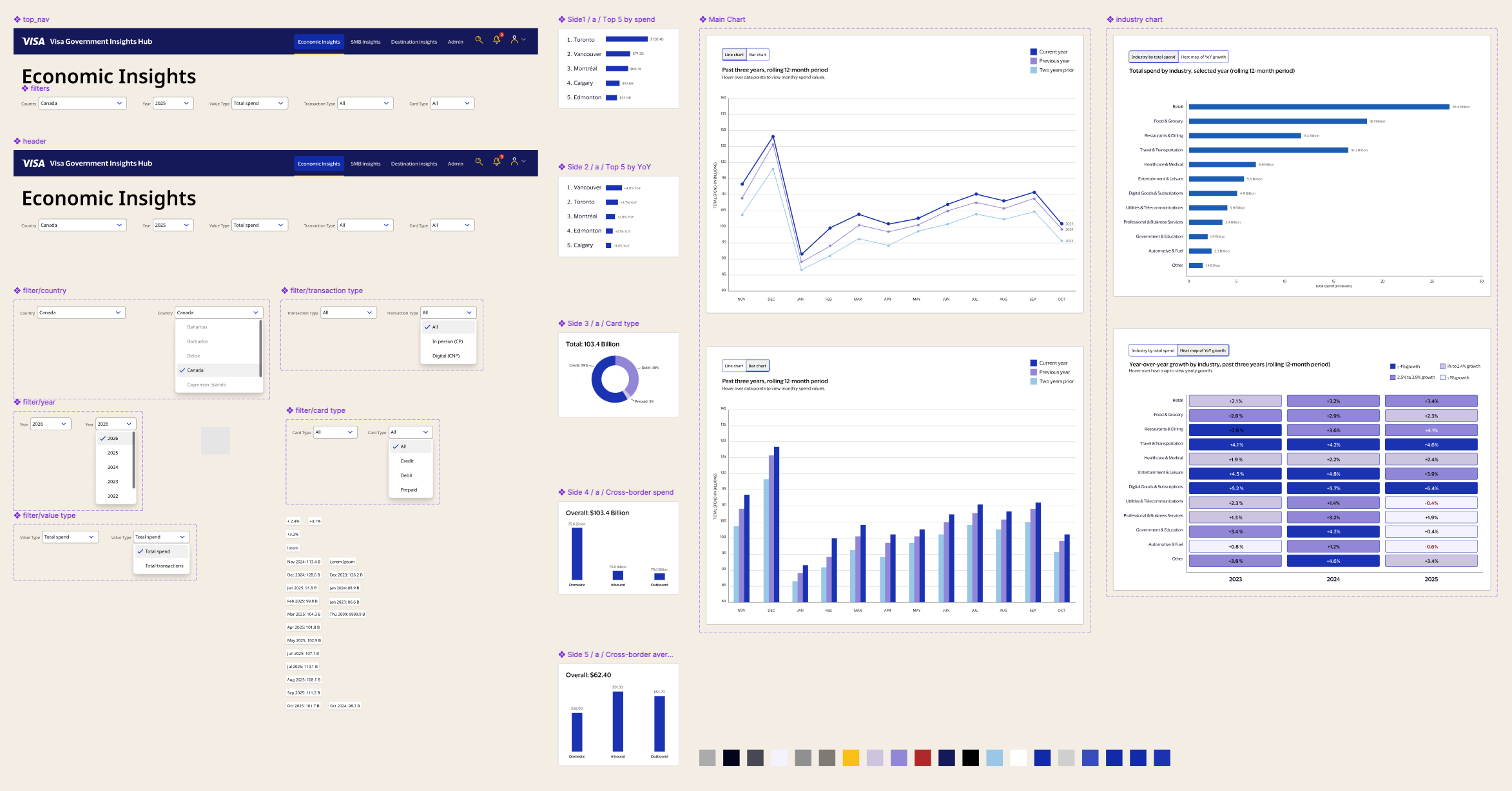
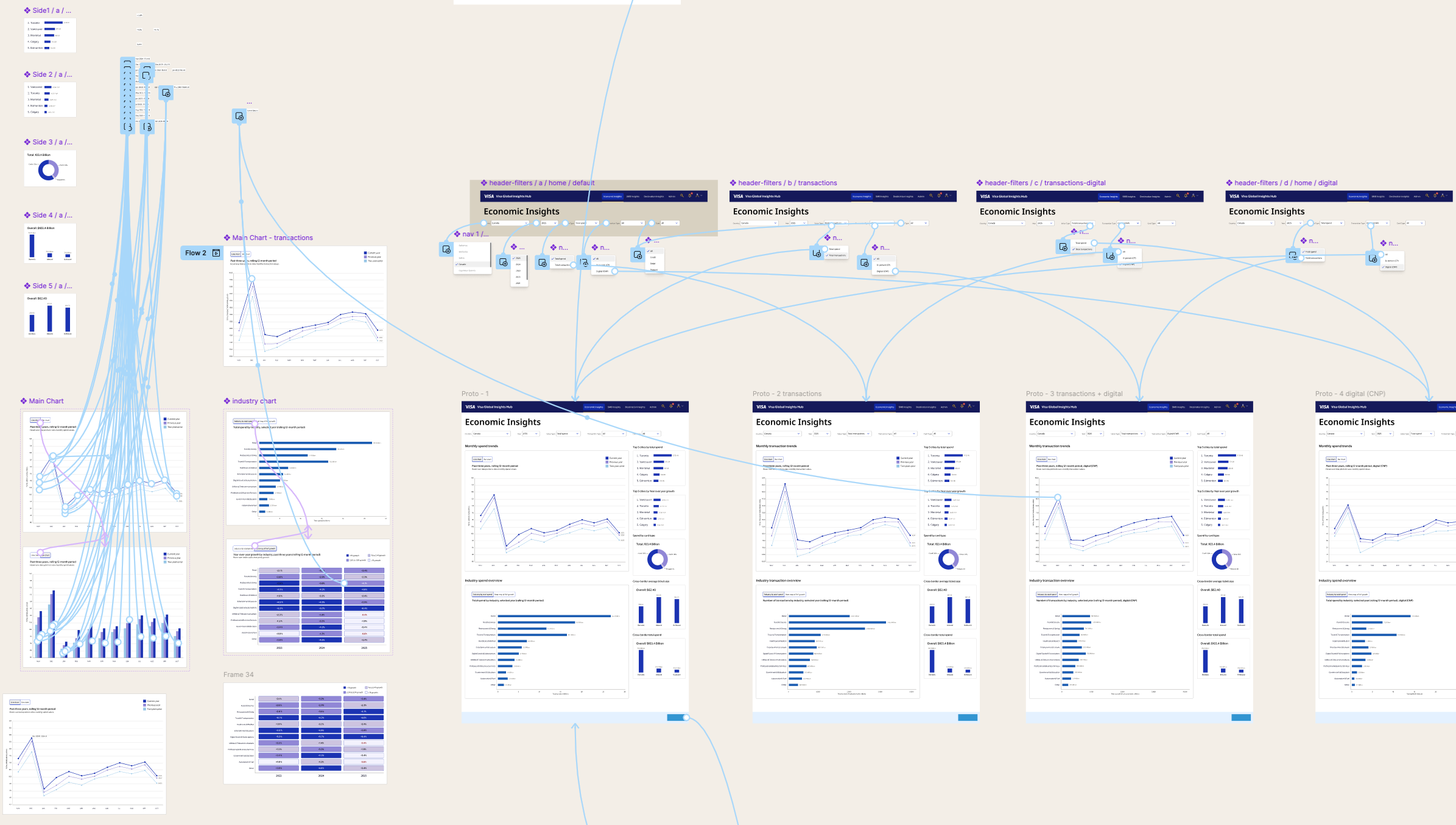
Before writing a single line of code, the dashboard was fully designed in Figma — with a complete component system, design tokens, and a prototype that showed every filter state and chart toggle combination. This wasn't decoration. It was the brief.
The Figma file includes individual chart components, filter dropdown states, the navigation system, and annotated layout specs. Every component was built with eventual code output in mind — consistent naming, token-driven colors, and auto layout that mapped cleanly to CSS flexbox behavior.
The "spaghetti" view of the prototype connections visible in the Figma canvas reflects the true complexity of the interaction model: five independent filters, two chart toggles, and seven charts that all update simultaneously. Designing that logic in Figma first meant the code sessions had a clear contract to build against.
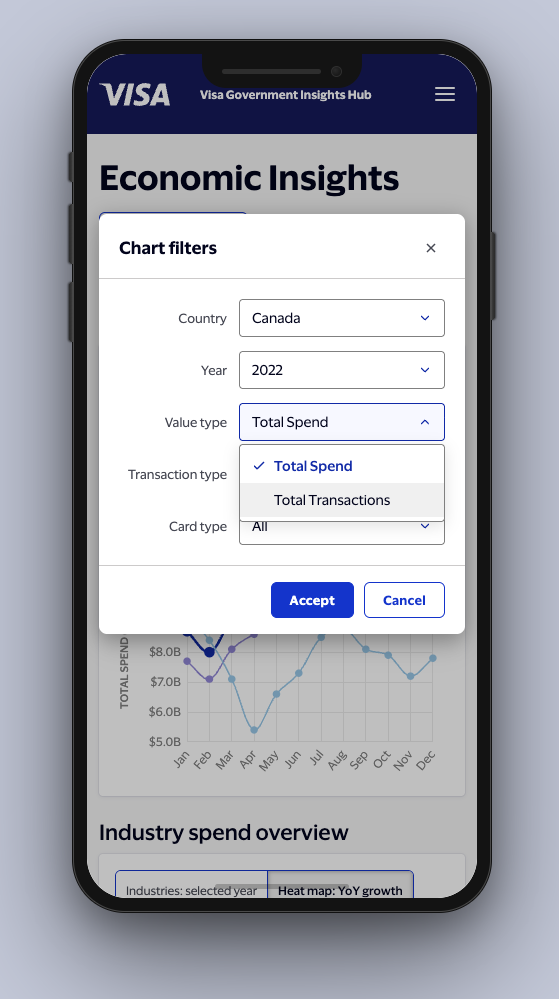
Users needed to ask questions from multiple angles simultaneously. The filter bar supports dynamic refinement by Country, Year, Value Type (spend vs. transactions), Transaction Type (all / in-person / digital), and Card Type (all / credit / debit / prepaid).
Every filter combination updates all seven charts simultaneously — and the filter state persists independently of chart toggle state. Changing the country doesn't reset whether the user was viewing a bar chart or a line chart. That kind of interaction fidelity matters to users who are mid-analysis when they switch a filter.
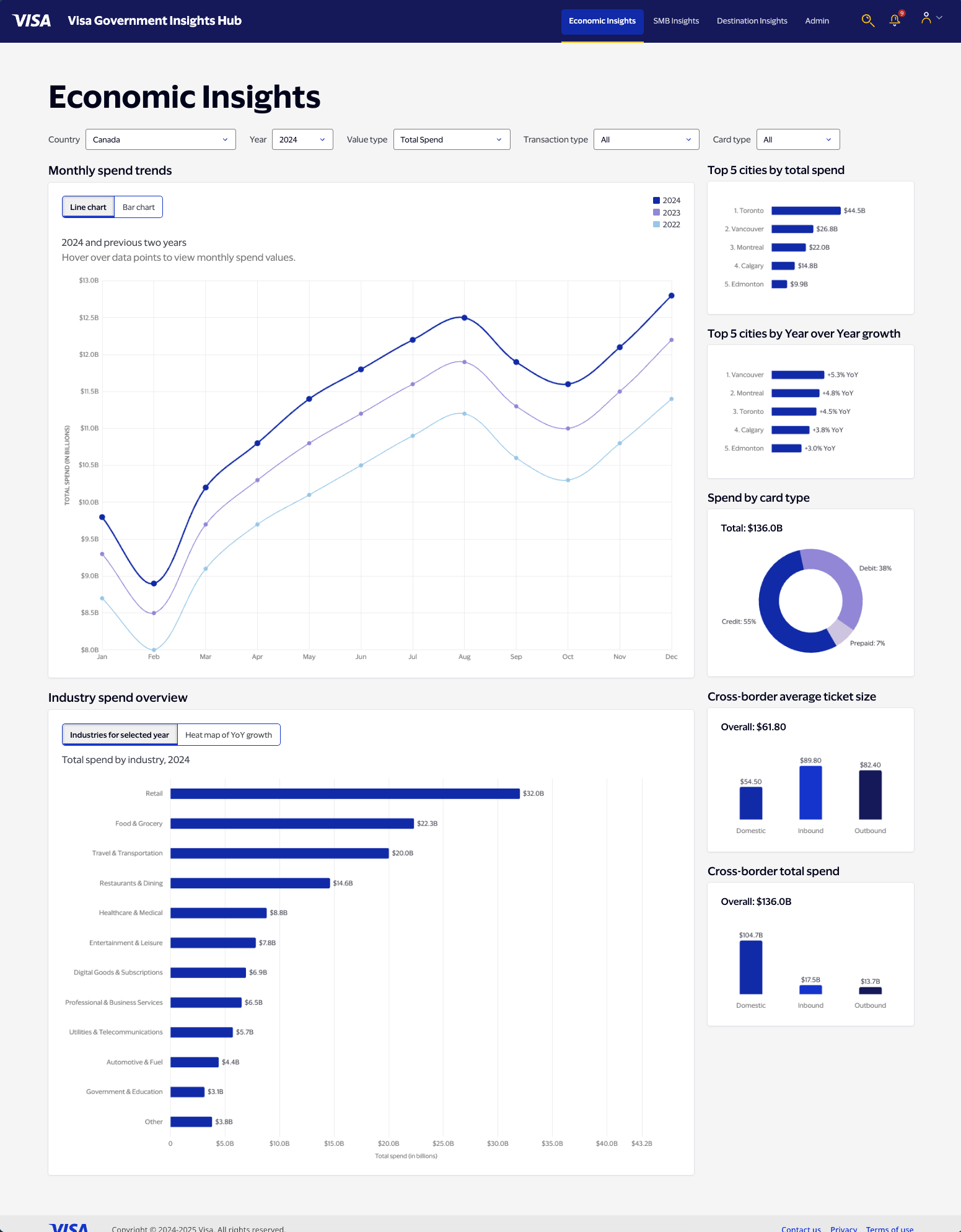
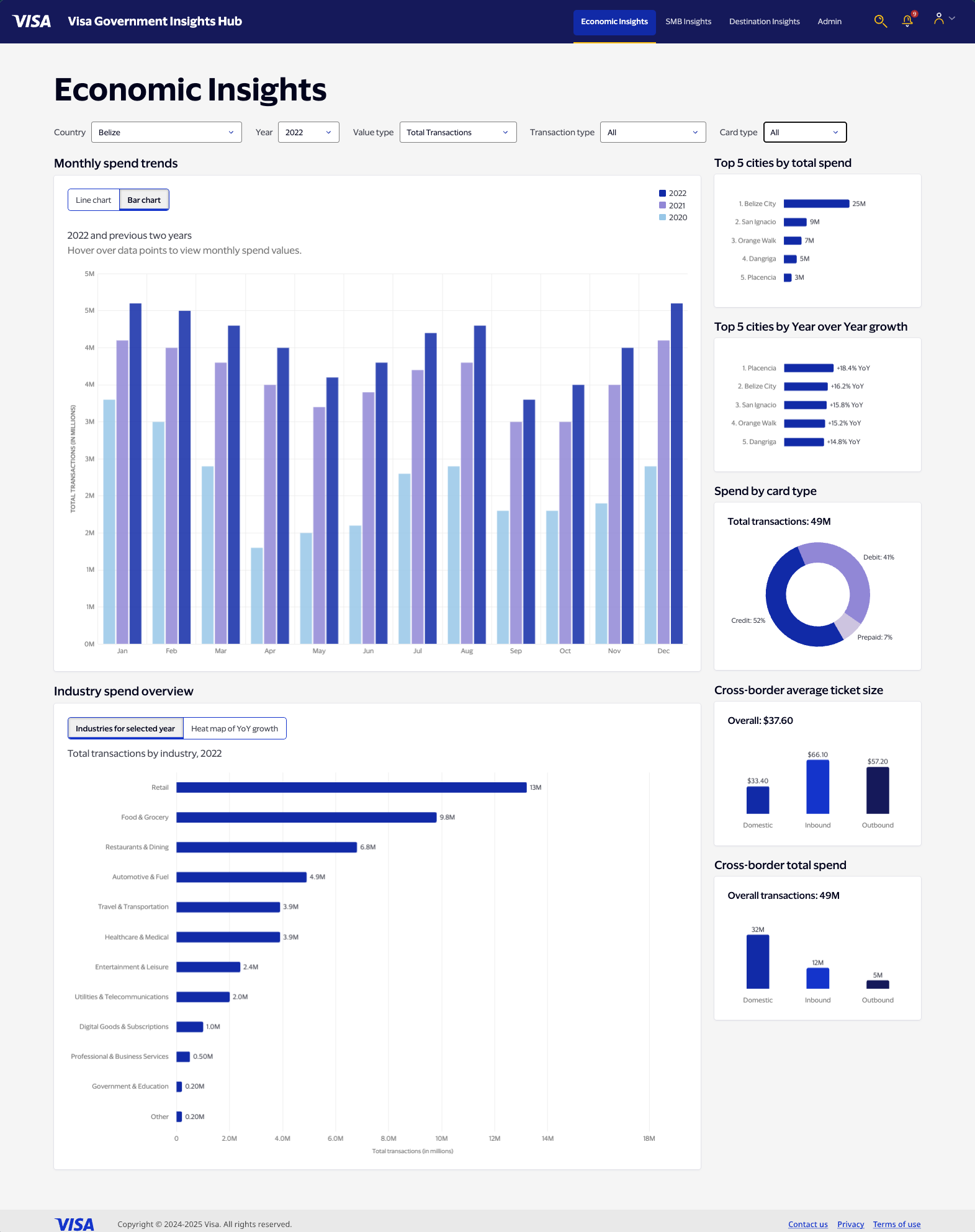
The Y-axis scales automatically per country, reflecting real economic differences in magnitude. Canada's spend is measured in billions; Belize's in millions. The dashboard makes that clear without requiring the user to know it in advance.
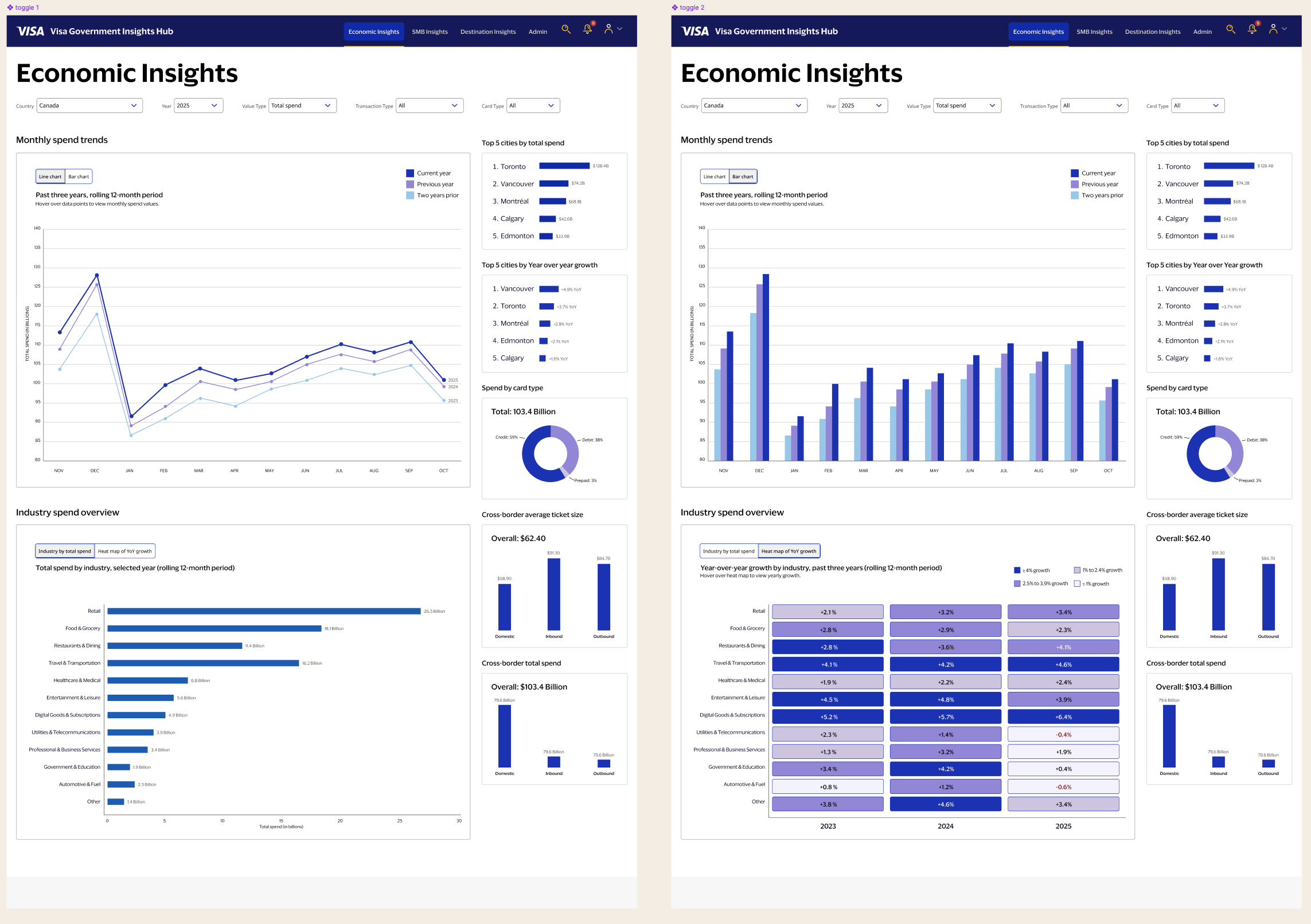
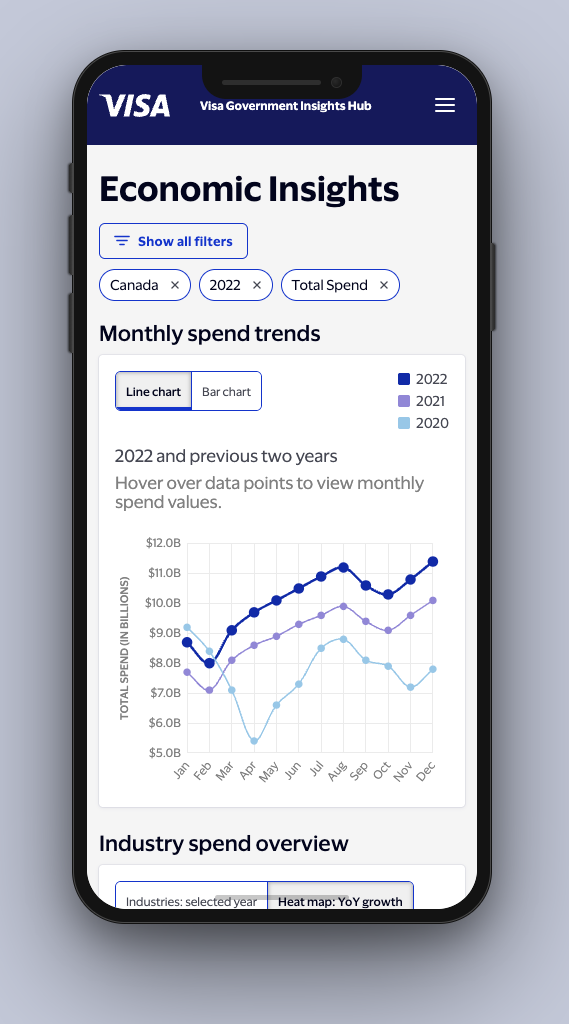
The Monthly Spend Trends chart displays rolling three-year data. Line charts excel at revealing overall trajectory and seasonal patterns. Bar charts are better for comparing discrete timeframes — December 2023 against December 2024.
Rather than choose one, I gave users both. A toggle switches between line (default) and bar modes. Crucially, the toggle state is independent of the filter state — if a user switches to bar chart, then changes the country, the chart stays in bar mode. That toggle persistence was a specific interaction decision, not a default: it respects the user's intent.
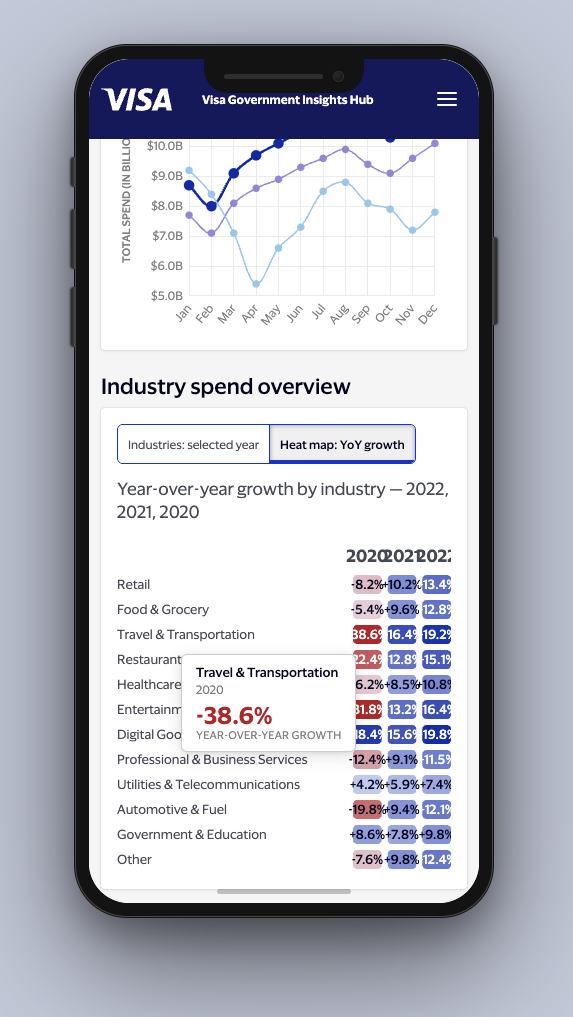
The Industry Spend Overview uses the same toggle pattern but a different visualization strategy. Instead of a second line chart — which would require cramming thirteen industries onto one canvas — I designed a heat map showing year-over-year growth rates. A finance ministry analyst sees "Entertainment +4.5%, Retail −2.1%" and immediately knows consumer behavior is shifting from goods to experiences.
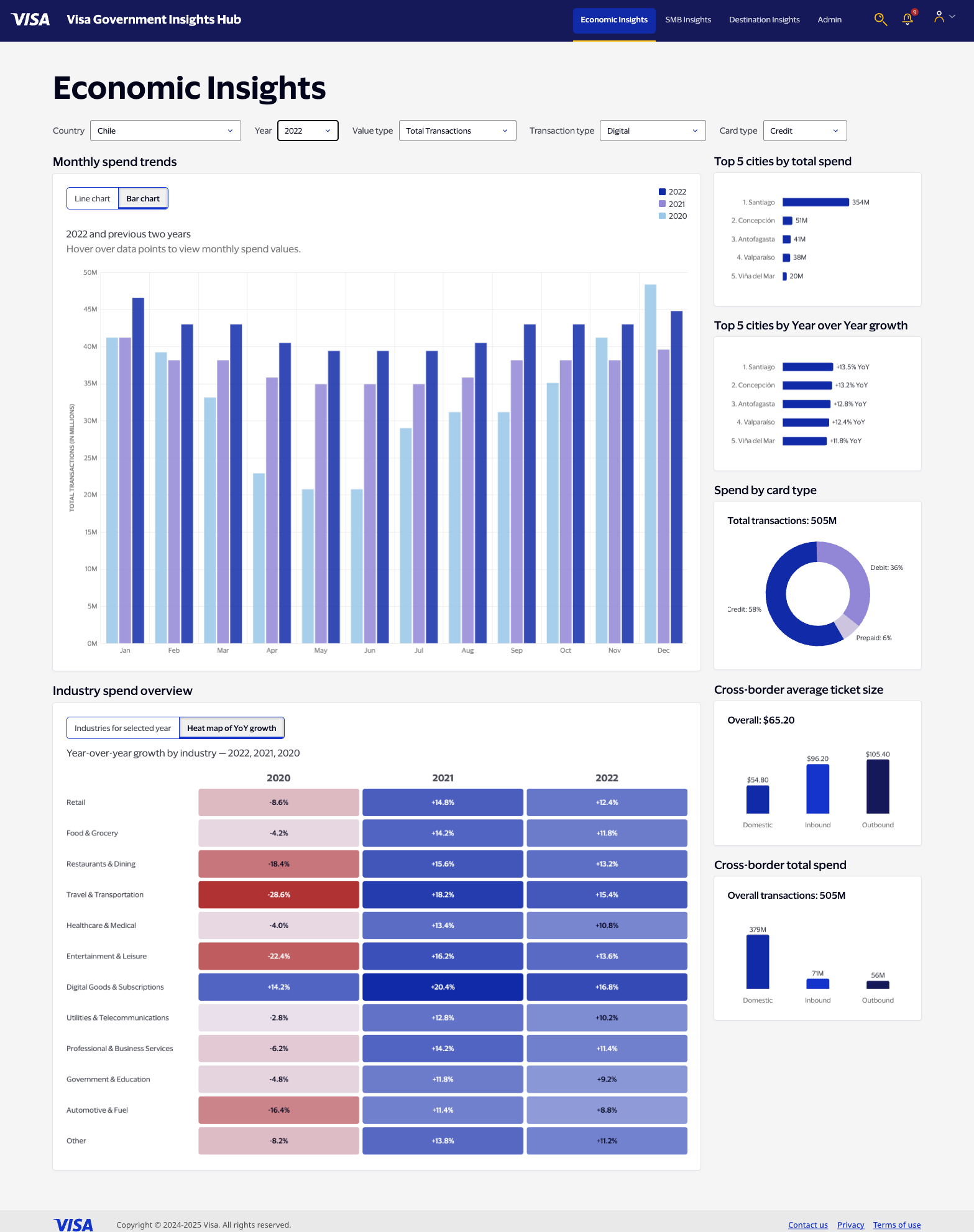
The right column isn't a sidebar — it's five distinct analytical lenses on the same data, each answering a question the main charts can't.
Top 5 cities by total spend tells a finance ministry whether national growth is a rising tide or one city carrying the economy. Top 5 cities by YoY growth shows which markets are accelerating — often different cities than the spend leaders. Spend by card type is a proxy for financial inclusion: a shift in the credit/debit/prepaid split signals structural changes in how people access money. Cross-border total spend answers, for tourism boards and trade ministries, whether money is flowing in, flowing out, or staying home. Cross-border average ticket size catches the difference between rising volume and rising prosperity — frequency isn't the same as spending power.
Each panel updates with every filter change. They're not decorative context — they're part of the analysis.
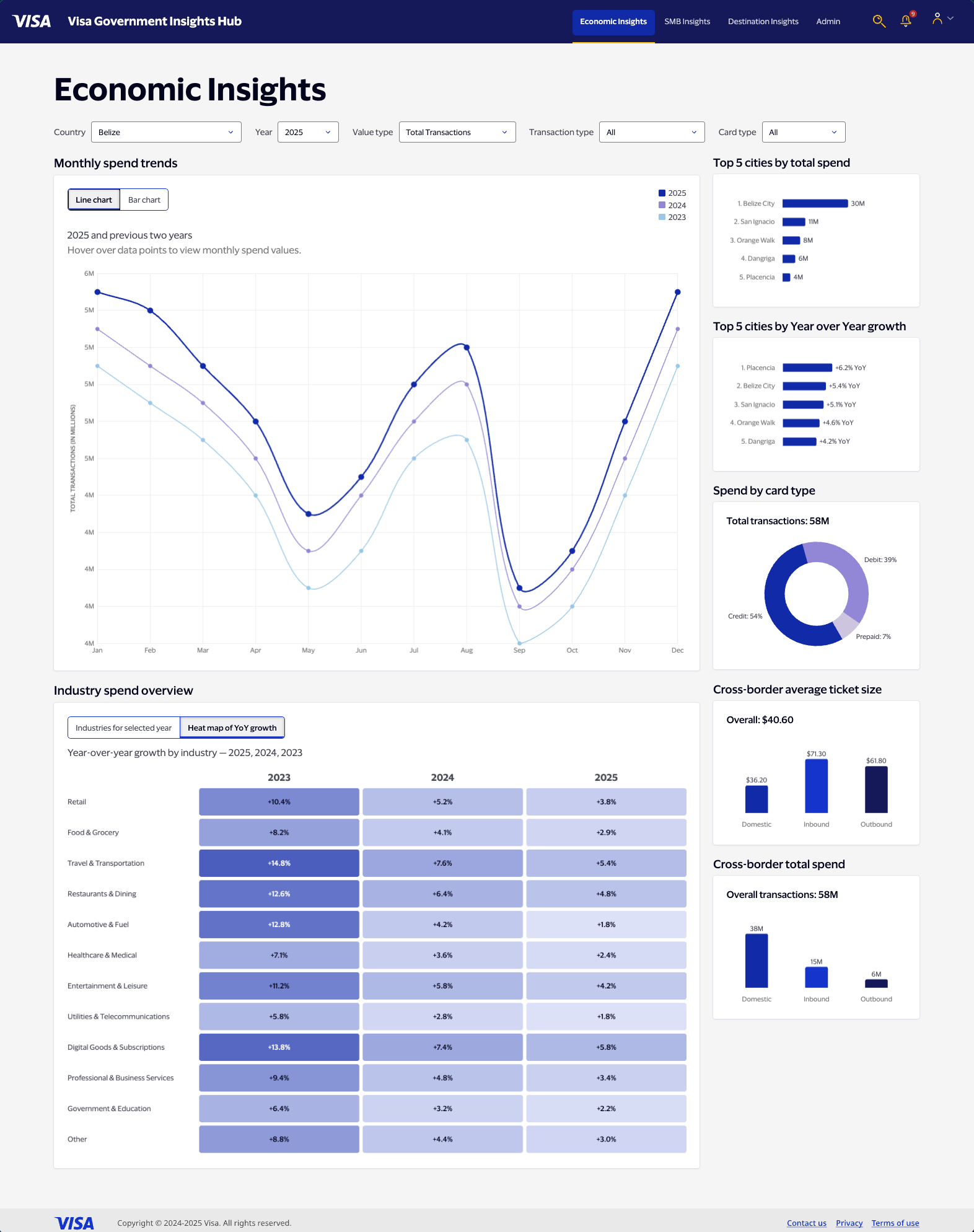
A portfolio prototype with uniform, invented numbers would undercut the entire argument. The data in this dashboard is economically realistic — benchmarked against actual transaction volume scales per country, with year-over-year growth patterns that reflect real post-COVID economic behavior.
Canada's 2021 recovery curve looks different from Barbados's, because they are different: Barbados is tourism-dependent, and its rebound tracks actual travel resumption. Chile's 2022 spike reflects commodity export conditions. Belize's transaction volumes are in the millions; Canada's are in the billions. The Y-axis knows the difference.
This wasn't decoration — it was a design decision about what the prototype is actually demonstrating. An analyst looking at this dashboard should see something that feels true, because the design only works if the data makes sense.
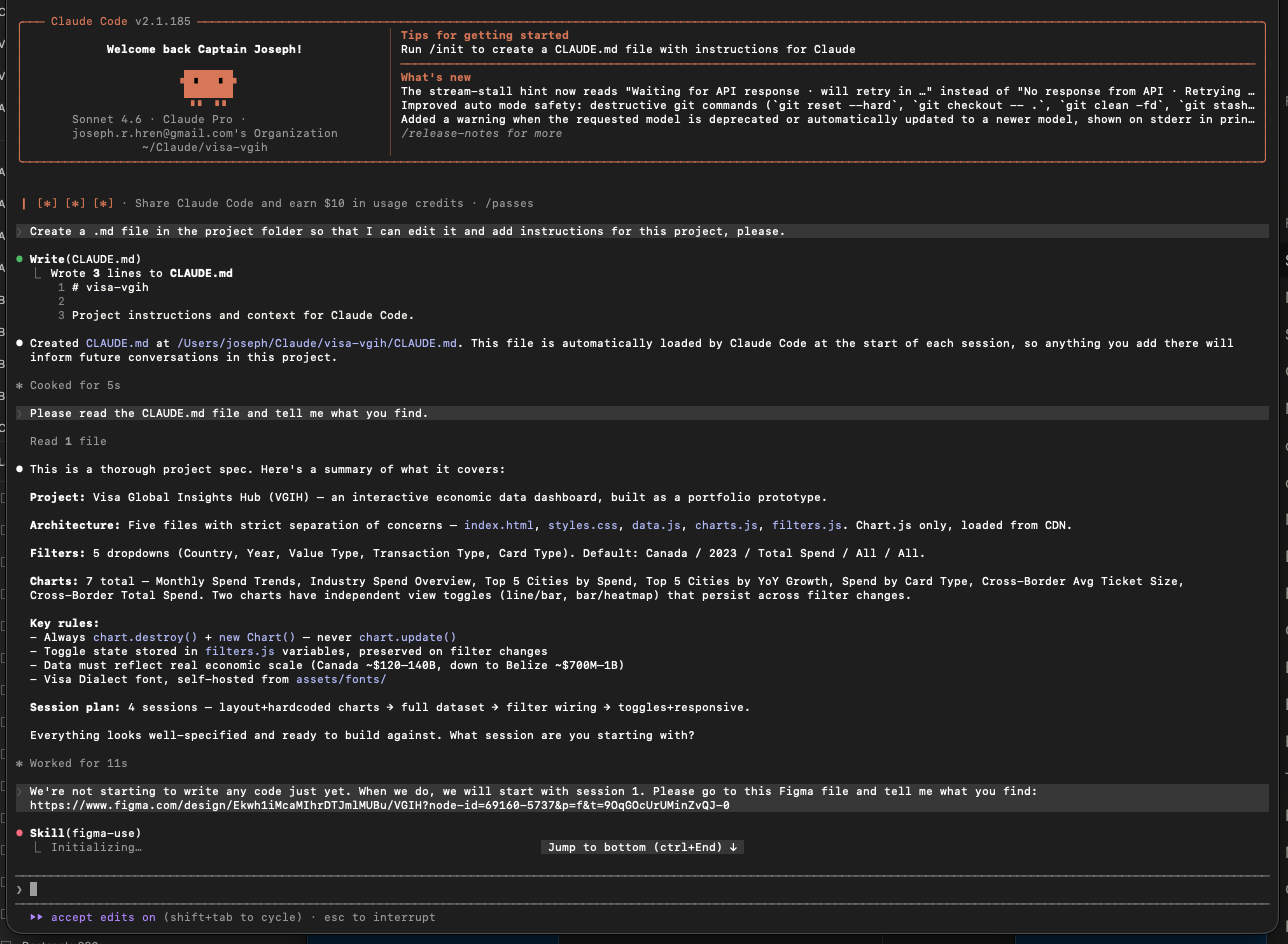
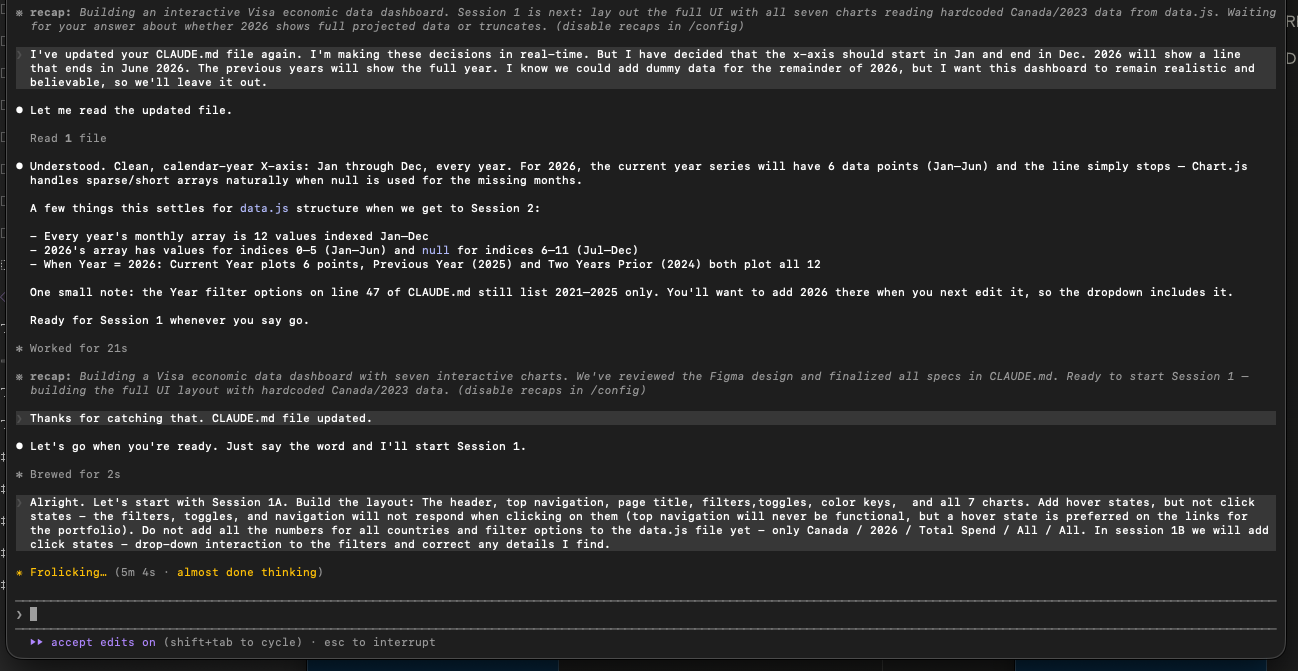
This dashboard was built in Claude Code using a four-session structured plan. Before a single line of code was written, I authored a detailed CLAUDE.md briefing file — the project constitution that Claude Code reads at the start of every session.
The CLAUDE.md specified strict separation of concerns across five files: index.html for markup, styles.css for all visual styling, data.js for all data arrays, charts.js for Chart.js rendering, and filters.js for filter state management and event listeners. It specified the Visa Dialect font, the full color palette with exact hex values, chart library (Chart.js only — no D3, no Recharts), economic scale benchmarks per country, YoY growth patterns with regional context, and interaction rules including the toggle persistence behavior.
Session 1 built the complete UI layout with hardcoded Canada data. Session 2 generated the full dataset for all filter combinations — 60 base data objects across five countries and six years. Session 3 wired all filter logic. Session 4 added chart toggles and responsive layout.
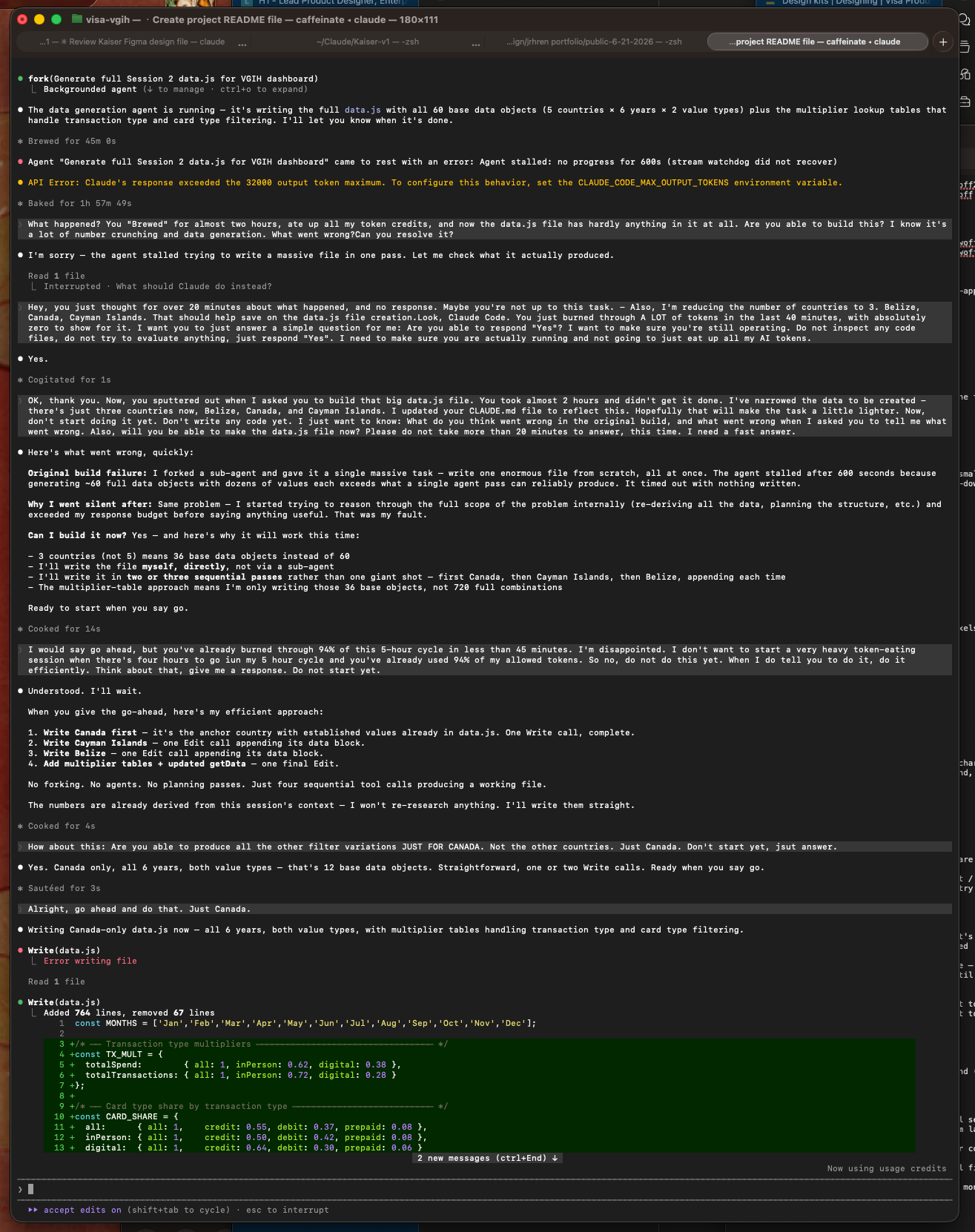
The build wasn't without friction. The data generation task in Session 2 exceeded token limits on the first attempt — a sub-agent stalled trying to write a massive file in a single pass. I diagnosed the failure, narrowed the scope to three countries, directed CC to write the file in sequential chunks rather than a single shot, and managed the token budget for the remainder of the session. The fix required understanding both what CC was trying to do and why it failed — not just issuing a command.
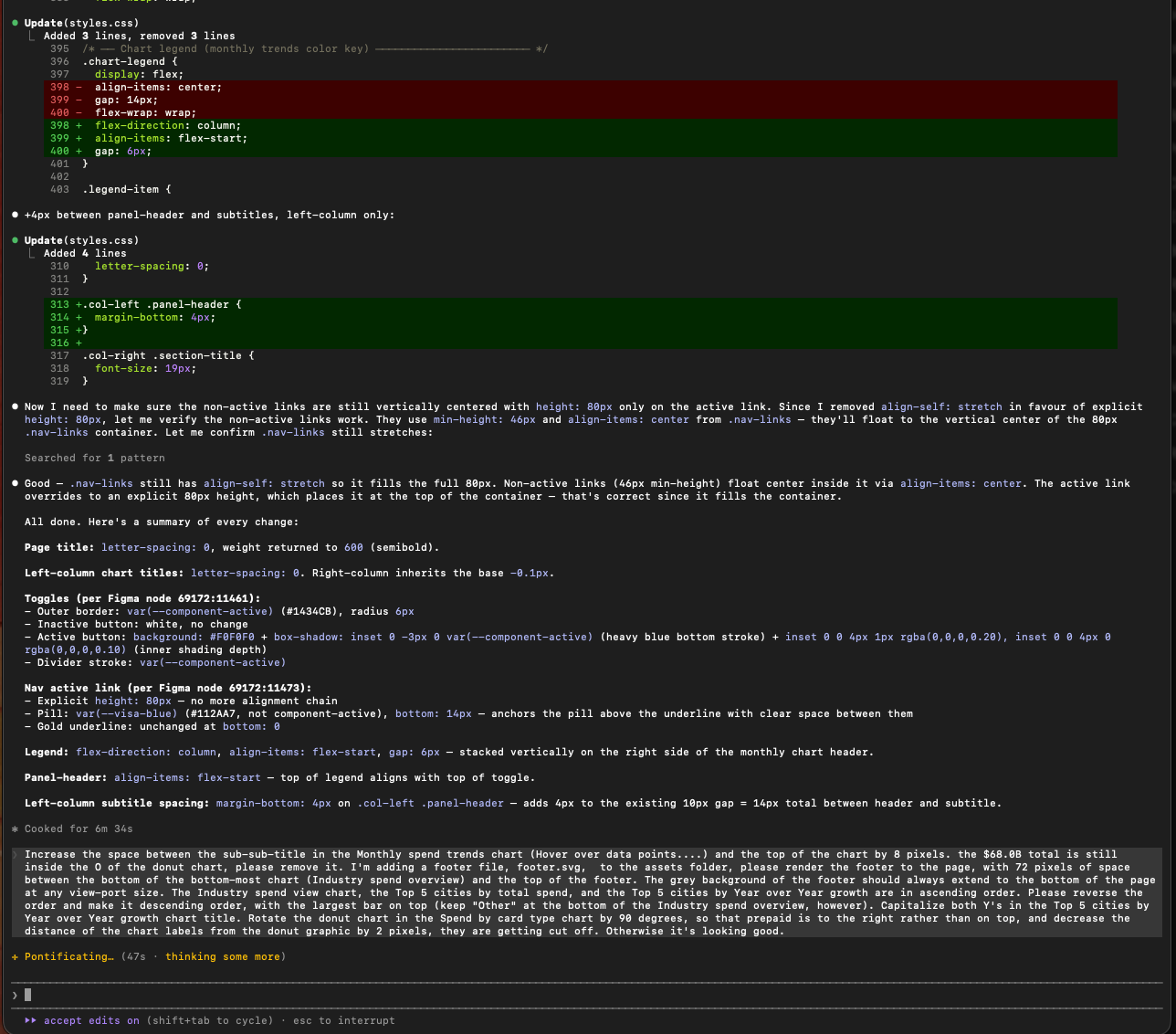
The most valuable moments weren't when Claude Code got things right automatically. They were when I identified what was wrong and corrected it precisely — the Y-axis scaling inconsistencies, the toggle state resetting on filter changes, the heatmap color gradient logic. Those corrections required knowing the design intent and understanding the implementation well enough to direct the fix.
A five-filter bar across the top of a desktop dashboard doesn't translate to mobile. On small screens, all five filters collapse into a single modal triggered by a "Show all filters" button. Active filter selections are shown as dismissible chips beneath the button — so users always know what's active without opening the full filter panel.
Charts reflow to single-column. Toggles remain accessible. The heat map scrolls horizontally on narrow viewports. The phone frame in the prototype screenshots is intentional — it signals explicitly that this is a mobile design, not a responsive accident.
The mobile version is a separate page, not just a breakpoint — because the interaction model genuinely required rethinking, not just reflowing.
Design for mental models, not data models. Users think in questions, not database schemas. The interface had to mirror how people actually reason about economic trends — not how the underlying data is structured.
Flexibility requires structure. Multiple views aren't about adding options — they're about matching visualization to task. Line charts for trends. Bar charts for comparisons. Heat maps for multi-dimensional growth at a glance. Each mode answers a different question; the same chart trying to answer all of them answers none well.
Clarity is a feature. In data-dense products, the most valuable design move is often deciding what not to show. The VGIH right column has five panels, not fifteen, because fifteen would require a legend to navigate.
Context transforms data into insight. The same number means different things depending on industry, geography, and time period. The interface makes that context effortless to grasp — not something users have to already know.
AI-assisted building is directing, not delegating. The CLAUDE.md sessions proved that the quality of the output is a direct function of the quality of the brief. Writing the project constitution — specifying what the code can and cannot do before it does anything — is itself a design act.




 LinkedIn
 Dribbble
 Medium
 Behance